← Gaming, Streaming & Esports
▣ Distilled locally
DLSS Swapper Adds Bulk Swap for DLSS, FSR, and XeSS Across Entire Game Libraries
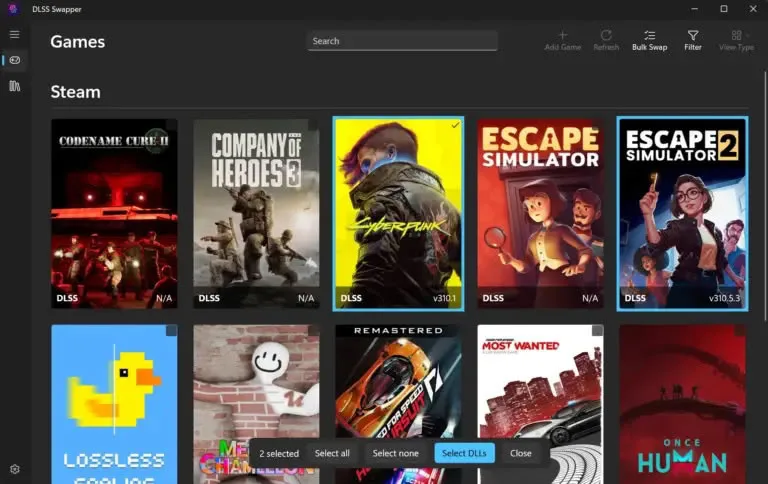
DLSS Swapper finally supports bulk DLL swapping, with version 1.2.7.0 landing on GitHub on October 18. Brad Moore's open-source tool lets PC gamers upgrade or downgrade the DLSS, FSR, and XeSS files in their installed games without waiting for a developer patch, but until now, that meant going through every game one at a time. Videocardz points out that the new Bulk Swap button in the games page toolbar lets users tick multiple games, then pick a version for each DLL type, plus presets for DLSS Super Resolution, Frame Generation, and Ray Reconstruction. Every row defaults to "Don't change," so nothing gets touched unless it's chosen. Apparently, users had been asking for this on GitHub for quite a while, with some saying they had well over 50 DLSS games to update by hand.
Bulk restoration of the original DLLs made it in too. Moore had pointed out in that same thread that users would need an easy way back if a new DLSS build turned out to be a regression across, say, 160 games. Of course, a swapped DLL can still stop a game from launching, and titles with anti-cheat might flag modified files, so online games are probably best left alone. The update also adds DLSS Frame Generation Preset C, the faster performance mode NVIDIA pushed to its app beta last week, which modders have already brought to RTX 30 cards. A bug that could stop the game library from loading has also been fixed, and full library scans are faster too. Manual swappers can still grab individual files from TechPowerUp's DLSS DLL archive.
↑ Back to top
Originally published by TechPowerUp ↗
· rebuilt here from its own full-text RSS feed · all rights
remain with the publisher, please read and support them there.