How to Personalize Your PS5 Gaming Setup on a Budget
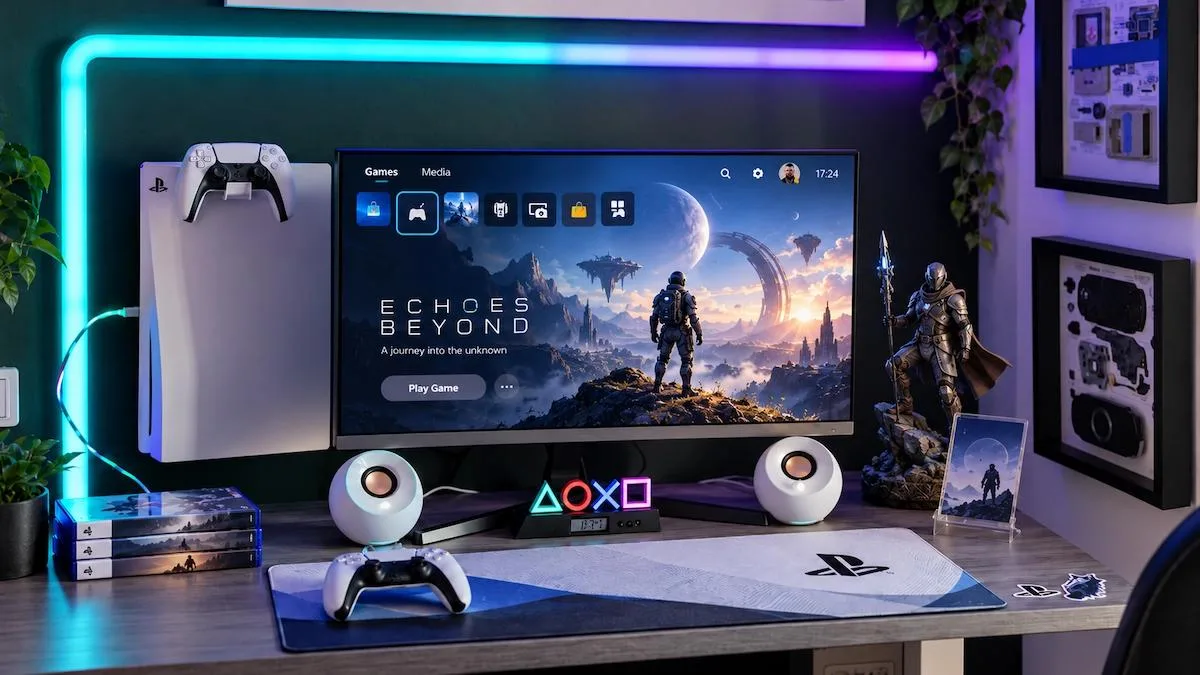
You don’t need a wall of RGB panels or a new monitor to make your PS5 corner feel like yours. Most gaming desks have the same starting point: a screen, a console, a DualSense, and more cables than anyone wants to look at. The difference between a generic setup and a personal one often comes down to the details around that hardware.
A few deliberate changes can make the space more comfortable, easier to keep tidy, and unmistakably connected to the games you enjoy. Here’s where to spend a little—and where to spend nothing.
Start With the Layout, Not a Shopping Cart
Before buying another accessory, empty the desk and put back only what you use during a normal session. Position the screen where you can view it comfortably, keep the controller within easy reach, and leave a spot for a drink that isn’t next to the console or its cables. If you switch between gaming and school or work, reserve a clear patch of surface for a keyboard or notebook.
The PS5 also needs breathing room. Sony recommends at least 10 cm (about 4 inches) of clearance around the console and warns against cramped spaces or blocked vents; its ventilation guidance is worth checking before you tuck the system into a shelf. A good-looking desk isn’t an upgrade if the console has nowhere to exhaust heat.
Choose One Visual Theme and Stick With It
The simplest way to make mismatched gear look intentional is to pick a palette before buying decorations. The PS5’s white-and-black design works well with neutral accessories and one accent color: deep blue, forest green, or even a restrained orange. Matching everything perfectly isn’t necessary; repeating a color two or three times usually does the job.
You can go further with a game-inspired mood. A dark, industrial look fits something like Cyberpunk 2077; natural textures and muted colors suit the atmosphere of Ghost of Tsushima. Borrow the feeling rather than filling every surface with logos. You’ll be less tempted to redo the entire room when your next favorite game arrives.
Make Stickers the Personal Touch
Stickers are one of the easiest ways to carry a theme across objects that don’t otherwise match. A small character illustration on a storage box, a symbol on a notebook, and a matching design on a headset case can make the desk feel curated without adding clutter. They’re also much easier to change than furniture or wall paint.
Pick the Finish for the Surface
A matte sticker looks subtle on a black desk organizer; a holographic detail can catch ambient light on a case or display board. Die-cut designs work well as individual accents, while sticker sheets suit smaller motifs you want to repeat. If you’re using your own art or a design you have permission to reproduce, collections of custom stickers offer a practical way to choose different shapes and finishes for a coordinated setup.
Think about placement before peeling the backing. Smooth, clean storage containers, clipboards, and removable display panels are safer bets than delicate finishes. Test adhesive on an inconspicuous area if you’re worried about residue. Avoid covering PS5 vents, ports, labels, or controls, and don’t apply decals where they could interfere with the DualSense’s moving parts. You can get the same visual impact by decorating the objects around your hardware.
Tackle Cable Clutter for a Few Dollars
A clean gaming setup often starts under the desk. Group the HDMI, power, and charging cables by where they travel, then secure loose runs with reusable hook-and-loop ties. Adhesive cable clips can guide a charging lead along the back edge so it stops falling to the floor every time you unplug your controller.
Keep enough slack for moving equipment and avoid sharply bending cables or trapping them under furniture. If you use a power strip, place it somewhere accessible and follow its rated limits rather than hiding it beneath rugs or piles of fabric. None of this is glamorous, but it’s the sort of change you notice every time you sit down.
Use Light to Change the Mood, Not the Hardware
You don’t need to light the whole room blue to get a PlayStation feel. One low-cost LED strip behind the monitor or a small desk lamp aimed at the wall can soften the contrast between a bright screen and a dark room. Warm light is comfortable for a relaxed single-player evening; a restrained blue or purple accent can suit a sci-fi theme.
Put the light source out of your direct line of sight so it doesn’t reflect across the display. If you choose LED strips, attach them to the desk or monitor housing where the manufacturer permits—not across the PS5’s air vents. Start with one light and live with it for a week before adding more. The aim is atmosphere, not a distraction during a boss fight.
Give Your DualSense and Headset a Home
A controller left in the middle of the desk makes everything else feel crowded. A small stand, wall hook designed for accessories, or a dedicated tray makes it easier to find your DualSense and keeps the thumbsticks away from loose items. If you use a headset, a simple hook under the desk can free up surprising amounts of surface space.
Don’t assume you need a premium charging dock. If a cable already works for your routine, route it neatly and save the money. Check the fit and charging compatibility before purchasing third-party accessories, particularly if you alternate between different controllers or PS5 models.
Let the Games Supply the Decoration
The most interesting game rooms usually have something more specific than generic neon signage. Frame a small piece of art from a title you love, display a physical game case on a narrow shelf, or choose a desk mat that echoes a favorite game’s colors. One well-placed collectible can say more about your taste than a row of inexpensive figures bought just to fill space.
For a PlayStation nostalgia corner, try a few understated references to the PS1 or PS2 era. If you’re into modern adventures, use landscape art or a color palette instead of plastering every wall with character portraits. For original fan-inspired creations, use art you’re entitled to print or display and respect any licensing restrictions. Keep the display small enough that it doesn’t compete with the screen.
What a $60 Refresh Could Look Like
If you have a fixed budget, set spending caps before opening a store tab. This is an example allocation, not a list of guaranteed retail prices; you can spend less by reusing supplies you already own.
Upgrade
Suggested budget
What it solves
Reusable cable ties and clips
$10
Messy cords and lost charging leads
One soft accent light
$15
Harsh lighting behind the screen
Controller stand or hook
$10
Cluttered desk surface
Stickers or a small art print
$15
Lack of personal character
Small tray or organizer
$10
Loose everyday accessories
Total spending cap
$60
Prioritize the changes you will notice
If your cables are already managed, move that allowance toward a better desk mat or a print you actually want to look at. If your setup is cramped, prioritize organization over decoration. The best budget is the one that fixes your own desk’s problems.
Keep It Comfortable—and Easy to Change
Leave room for your hands to move, angle your screen to avoid glare, and keep things you grab often within reach. Dust the console’s vents regularly following Sony’s cleaning guidance. When you rearrange, check that no decoration blocks airflow or makes a power cord difficult to access.
Most importantly, let the setup evolve. A new game, an art print you picked up at a convention, or a sticker you designed yourself is a better reason to change the look than a trend on social media. Your PS5 corner should feel like a place you want to play, not another expensive project to finish.