Cougar DuoAir Review – Glass or Mesh?
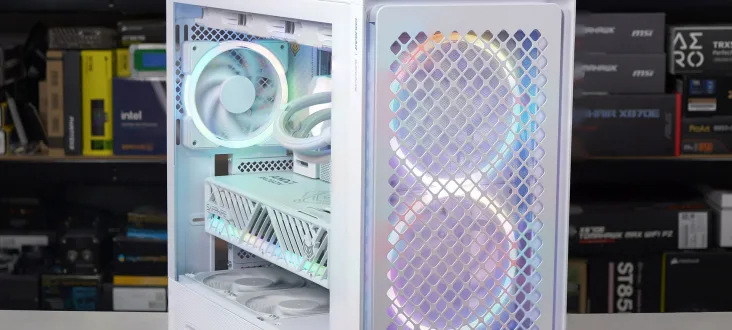
The Cougar DuoAir gets its slightly clunky name from the inclusion of two front panels in the package. The default panel is clear glass but you can switch to the alternate metal mesh panel in a matter of moments. No matter which panel you select the two 140mm ARGB fans in the front of the case shine through brightly and the overall effect of our finished PC is utterly blingtastic.
Timestamps
00:00 Intro
00:34 A slight logistics issue…
01:38 Key features of the DuoAir
02:42 A quick teardown
05:17 Building the PC
07:17 Smoke airflow tests
07:54 Thermal + acoustic tests
10:22 Pricing discussion + closing thoughts
Main features
- Interchangeable glass/mesh front panels allow for easy transition between maximum cooling and premium build visibility.
- A front-mounted PSU placement clears space for true vertical intake.
- Perforated bottom side panels significantly enhance lower fan intake.
- Pre-installed 5-fan configuration: 2x 140mm ARGB front fans, 1x 120mm ARGB rear fan, and 2x 120mm bottom fans.
- Premium ZPX/ZPB fans utilise Rifle Bearing and stabilising rings to reduce turbulence and ensure silent, long-lasting operation.
- Accommodates large 410mm GPUs while maintaining a compact overall footprint.
- Refined rounded edges offer a modern alternative aesthetic and gentler handling.
- Three integrated dust filters, including a stylish quick-slide front filter, provide effortless maintenance and long-term protection.
- A discreetly positioned ARGB light bar adds ambience without disrupting front profile.
Specification:
- Motherboard support: ATX, Micro-ATX, Mini-ITX.
- Power supply support: ATX.
- Expansion slots: 7.
- Included fans: 2x 140mm ZPX ARGB 1,800rpm front intake, 1x 120mm 2,200rpm ZPX ARGB rear exhaust, 2x 120mm 2,200rpm ZPB floor intake.
- Fan mounts: 2x 140mm front, 2x 140mm/3x 120mm roof, 1x 120mm/140mm rear, 2x 120mm floor.
- Radiator mounts: 280mm/360mm roof.
- 5.25-inch optical drive bays: None.
- Internal drive bays: 2x 3.5-inch or 1x 3.5-inch and 2x 2.5-inch.
- Front I/O ports: 2x USB 3.0 Type-A, 1x USB 3.2 2×2 Type-C, audio.
- Dimensions: 479mm H x 460mm D x 220mm W.
Testing
To put this case through its cooling paces we will be using a test system consisting of an AMD Ryzen 7 9850X3D, Sapphire RX 9070 XT and an SSD. This system allows us to produce a substantial amount of heat and effectively test the Cougar DuoAir‘s cooling capabilities.
Test System:
- Processor: AMD Ryzen 7 9850X3D
- CPU Cooler: Montech HyperFlow ARGB 360
- Motherboard: Sapphire Nitro+ X870EA PhantomLink Polar Edition
- Memory: 32GB G.Skill Trident Z5 NeoX RGB DDR5-6000
- Graphics card: Sapphire Nitro+ AMD Radeon RX 9070 XT 16GB
- Power supply: Fractal Design Ion 3 Gold 1000W
- SSD: Crucial T700 Gen 5 M.2 NVMe
- OS: Windows 11
Cooling Performance

Cooling Performance Overview
We saw a spread of 10 degrees C in CPU temperatures during our testing which is a very significant figure. Running the fans at a low speed so they are nice and quiet leads to a slightly hot PC, however increasing fan speeds to the maximum is horribly noisy. Our conclusion is that most people should use the mesh front panel and ignore the glass alternative, and that you should run the fans between 1,000rpm and 1,500rpm so you get a decent balance of noise to performance.
Closing Thoughts
The headline feature of the Cougar DuoAir is the choice of mesh or glass front panel and while it is a nice touch we consider it is a minor matter. The glass looks nice enough however the mesh also looks good and performs significantly better while also giving you a full ARGB light show. In our opinion the only reason to stick with the glass is an aesthetic choice as mesh is better in every practical sense.

Beyond that the DuoAir is solidly built and is supplied with five fans which means you have the minimum of assembly to perform when you build your PC. The fundamentals of this case are absolutely sound and Cougar has made no grievous errors or poor choices. The biggest compliment we can pay the DuoAir is that it looks entirely conventional while managing to tuck away a few neat touches just below the surface.
You will be able to buy the Cougar DuoAir for US$89.99.
Pros:
- Smart looks with clean styling.
- It’s clever without being too clever.
- The graphics card cooling system works well.
Cons:
- Cable management space is tight.
- The location of the front IO lends itself to having your PC on your desk.
- There is no separate fan rack in the top of the case.
- Does not support rear connection motherboards.
KitGuru says: Cougar DuoAir focuses on airflow to your graphics card, and also delivers an impressive ARGB light show from the fans and front panel.
The post Cougar DuoAir Review – Glass or Mesh? first appeared on KitGuru.