ICYMI: Python on Microcontrollers Newsletter: CircuitPython displayio on LVGL, MicroPython v1.30 Nears, Breadboard Simulator and More!

If you missed Monday’s Python on Microcontrollers Newsletter, here is the ICYMI (in case you missed it) version.
To never miss another issue, subscribe now! You’ll get one terrific newsletter each Monday, ad-free and spam-free.
Note Thanksgiving Week (US) will have an abbreviated newsletter due to the holiday.
From the Editor:
Welcome to the latest Python on Microcontrollers newsletter! This week I check the status of two huge updates: MicroPython v1.30 and CircuitPython 11. With newer microcontrollers gaining features, it is great to support these in software. Also, with greater memory sizes and speeds, fancier software methods can be used. For example, support for larger displays and the ability to use them in microcontrollers is wonderful and a far cry from the days of the Arduino Uno.
It’s the end of year drive to support the Python Software Foundation. Supporting the foundation helps Python to thrive and provide the services we all use. – Anne Barela, Editor
We’re on Discord, Twitter/X, BlueSky and for past newsletters – view them all here. If you’re reading this on the web, please subscribe here. Here’s the news this week:
CircuitPython displayio Now Runs on LVGL in Latest Alpha Versions on Select Chips

CircuitPython’s displayio now runs on the LVGL graphics library on ESP32-P4 and ESP32-S31 boards, in the Absolute Newest builds on circuitpython.org. Existing code works as is: Groups, TileGrids, Bitmaps, Palettes and vectorio shapes use the same API, with LVGL composing the screen. The new version is built for speed, and its internal formats are ready for the graphics accelerators in chips like the ESP32-P4. Audio keeps playing smoothly during screen redraws, and vectorio can now draw rounded rectangles, which need far less memory than bitmaps for dashboard-style widgets – GitHub.
The speed costs RAM, so code that ran slowly before may now run out of memory, and a new safe mode says so when it happens. E-paper displays aren’t supported on LVGL builds yet. Other boards keep the original displayio – GitHub.
MicroPython v1.30 Is 84% Done, Still Targeting December 7th
The MicroPython v1.30 milestone on GitHub is now 84% complete, with 133 items closed and 25 open, and the release still targets December 7th. Preview builds already add positional-only parameters, asyncio.Queue, WiFi HaLow (802.11ah) networking, OpenMV camera boards, the STM32N6570-DK, hardware floating point on RP2350 boards and a browser build of the WebAssembly port, and mpremote now resumes a board’s session by default. A minimal typing module, asyncio TaskGroups and HSTX output on the RP2350 are still under review – GitHub.
The de:volt Breadboard Simulator Runs MicroPython in the Browser
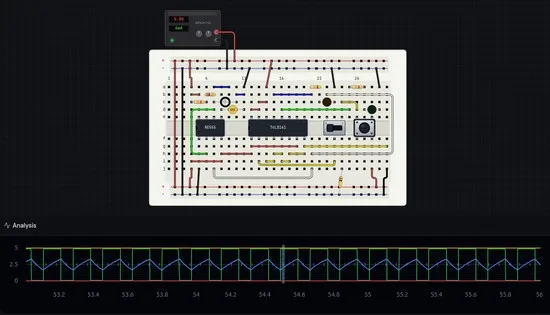
de:volt is a breadboard simulator that runs in a web browser, with 105 parts, a built-in four-channel oscilloscope and warnings for mistakes such as an LED with no resistor. Arduino, BBC micro:bit and RP2040 boards are available, and the Code panel runs MicroPython, tested in the article on a simulated Raspberry Pi Pico. A free version is online, with an AI assistant and more analysis tools in a paid Premium tier – CNX and simulator.
Pimoroni’s Art Matrix Runs MicroPython
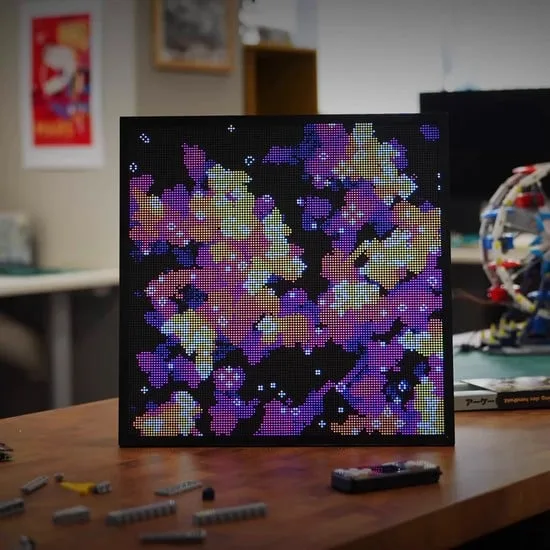
Pimoroni’s Art Matrix is a 128 x 128 RGB LED panel (16,384 pixels) in a black aluminum frame, driven by an RP2350B with WiFi and Bluetooth from a Raspberry Pi RM2 module. It ships with 45 plugins for algorithmic art, retro screensavers and live info, controlled from a browser on a phone, and the firmware and plugins are all MicroPython – X, Pimoroni and GitHub.
Support Python in the PSF Year-End Fundraiser

The Python Software Foundation, the nonprofit behind Python, PyPI and PyCon US, has opened its year-end fundraiser and membership drive. Donations and Supporting Memberships through donate.python.org pay for the Developers in Residence, security work across the Python ecosystem and the infrastructure the community relies on. A Supporting Membership is $99 a year, or $25 and up on a sliding scale, and comes with a vote in PSF elections – PSF blog and Adafruit Blog.
Raspberry Pi Accessories That May Not Be Worth It
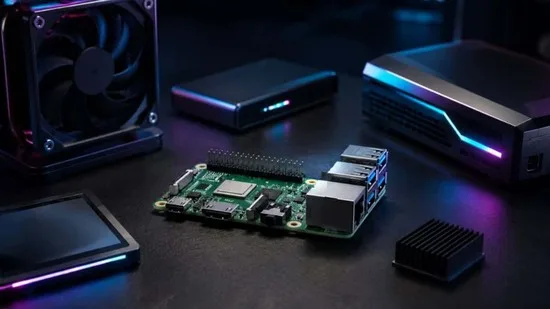
RaspberryTips goes through eight popular Raspberry Pi add-ons that are often more than a project needs, including the ICE Tower cooler, UPS and PoE HATs, cluster and RGB cases, AI HATs, the HQ Camera kit and small touchscreens. Each comes with a simpler pick, and the article suggests spending first on a good power supply, reliable storage, a practical case and proper cooling – RaspberryTips.
Python on RISC-V Reaches 1,500 Packages
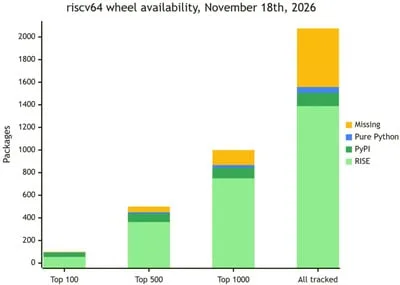
The RISE Project reports that 1,506 of the 2,076 most-downloaded PyPI packages with native code now have prebuilt riscv64 wheels, so pip installs them on RISC-V Linux boards without compiling from source. On a VisionFive 2 single board computer, the NumPy wheel installs in about 25 seconds, against roughly 15 minutes to build it. The wheels are built and tested on native RISC-V hardware, and 519 packages still lack one – Adafruit Blog and GitHub.
This Week’s Python Streams
Python on Hardware is all about building a cooperative ecosphere which allows contributions to be valued and to grow knowledge. Below are the streams within the last week focusing on the community.
CircuitPython Deep Dive Stream
Last Friday, Scott streamed work on More LVGL Displayio.
You can see the latest video and past videos on the Adafruit YouTube channel under the Deep Dive playlist – YouTube.
CircuitPython Parsec
John Park’s CircuitPython Parsec this week is on Display Shapes: Arc – Adafruit Blog and YouTube.
Catch all the episodes in the YouTube playlist.
Deep Dive with Tim
Last week, Tim streamed work on Porting TeensyChess to Metro ESP32-P4.
You can see the latest video and past videos on the Adafruit YouTube channel under the Deep Dive playlist – YouTube.
CircuitPython Weekly Meeting
CircuitPython Weekly Meeting for November 16, 2026 (notes) on YouTube.
Project of the Week: NoVas, a Keychain Companion With Pixel Eyes
NoVas is a keychain-sized companion with animated pixel eyes that blink, look around and change mood when tapped, stroked, held or shaken, plus clock and battery pages and a 3D-printable case whose generator code is included. It runs MicroPython on a Waveshare ESP32-S3-Touch-LCD-1.69, using the board’s touch screen, motion sensor, clock chip and buzzer – GitHub.
Popular Last Week
What was the most popular, most clicked link, in last week’s newsletter? Raspberry Pi Pico Control a Servo Motor With MicroPython (Beginner’s Guide).
Did you know you can read past issues of this newsletter in the Adafruit Daily Archive? Check it out.
Notes from Adafruit Playground
Adafruit Playground is a place for the community to post their projects and other making tips/tricks/techniques. Ad-free, it’s an easy way to publish your work in a safe space for free.
DrAldrin – Orbital Rendezvous – Adafruit Playground.
News From Around the Web
John Gallaugher shows the LeRobot leader and follower arms at The Hatchery Makerspaces at Boston College, now coded to prevent burnout of the follower arm when it is left on too long. A Raspberry Pi 5 runs the arms, and a Raspberry Pi Pico running CircuitPython handles the on/off control and a status display – Bluesky and Mastodon.
Pico Mixpad is a USB desk controller for Windows audio with a master volume knob, four per-app volume knobs, eight keys, an OLED and a mic-mute LED. CircuitPython on a Raspberry Pi Pico 2 (RP2350) reads the controls, and a Python host app on Windows sets per-app volume and serves a local settings page – GitHub and project page.
An Infineon tutorial turns a PSOC 6 AI Kit into a WiFi remote control for a PSOC Edge E84 AI Kit, with no router needed. The Edge board opens its own access point, and the PSOC 6 sends short text commands over UDP to toggle an LED, mirroring the remote LED’s state on its own. Both boards run MicroPython, deployed with Thonny – Hackster.
Issue 31 of Hello World, the free magazine for computing educators from the Raspberry Pi Foundation, focuses on physical computing and robotics in the classroom. Articles cover machine learning through movement, environmental data science, cyberdecks and making makerspaces accessible – Raspberry Pi.
SynthSync is a breadboard master clock for modular synths with up to eight trigger outputs, each set to its own multiple or division of the main clock. It runs MicroPython on a Raspberry Pi Pico 2 W (RP2350), with the chip’s PIO hardware timing each pulse, and is set from a phone or computer over WiFi – GitHub.
Curt Timmerman’s image-extract packs many pictures into one raw image file on a computer with Python and pulls single images back out for display on small screens with MicroPython. It was tested on an ESP32 Cheap Yellow Display with an ILI9341 screen – GitHub and Show and tell.
Wes Bos turned a GitHub Universe badge, a Pimoroni Tufty 2350 with an RP2350, into a pocket photo booth by adding an ESP32 camera, two LEDs as a flash and a Bluetooth thermal printer. A MicroPython app on the badge’s Badgeware firmware shows a live preview, takes a photo on a button press, dithers it to black and white and prints it – Hackster and Circuit Rocks.
Liz Clark (BlitzCityDIY) posted a short video of Winnie with a favorite Winamp skin running in CircuitPython, a nod to the classic desktop music player – Mastodon.
The WS-79 is a desk prop of the field radio from the game The Black Watchmen, playing in-game transmissions as sound for a phone app to decode. Python programs run the radio and its bar screen on a Raspberry Pi 4, and the repo includes a card-setup utility, parts list, wiring and 3D printed case files – GitHub.
An old VBM Junior espresso machine gets PID temperature control, button-driven machine states and pump control from a Raspberry Pi running Python. The build involves mains wiring – Instructables.
A LEGO Mindstorms EV3 robot maps an unknown maze with one ultrasonic sensor on a swiveling head, finds the goal, then drives back and speed-runs the shortest path. It runs MicroPython with Pybricks on ev3dev – GitHub and write-up.
ir-remote-lab captures the signals of an infrared remote control, measures the carrier frequency, compares repeated key presses and sends learned signals back through an IR LED, all controlled from a web page with a virtual remote. It runs CircuitPython on an ESP32-S3 and was tested with the remote of an older kitchen hood – GitHub.
Mosey is a Furby-inspired robot with a 3D printed shell, designed in Onshape, that moves its eyes, beak, tail and feet with four servos and plays sounds through a speaker. A sibling team built it, and it runs CircuitPython on a Raspberry Pi Pico in a robotics board – Instructables.
PicoMeter Touch is a handheld multimeter and component tester built on a Raspberry Pi Pico with a 2.8-inch color touchscreen, measuring voltage with an ADS1115 ADC, current with an ACS712 sensor, plus resistance, LEDs and continuity. It is written in MicroPython and runs from 18650 batteries in a 3D printed case – YouTube and GitHub.
Gary Benson ported Lander, David Braben’s game for the Acorn Archimedes, to MicroPython. It runs on the Pimoroni Presto and on the Badgeware badges such as the RP2350-based Tufty 2350 – GitHub.
Momo is a 3D printed desk companion modeled on a German Shepherd that answers questions with dog sounds and plays retro games. A Raspberry Pi 5 runs the Python backend with a Waveshare touch display, a USB microphone, four buttons and a MAX98357A I2S amplifier – Instructables.
Andrew has started lighting a model railway layout with a Raspberry Pi Pico W running CircuitPython. The Pico W dims short LED noodles with PWM, four per GPIO pin, each with a 220 ohm resistor – Bluesky.
Santa’s Workshop is a 3D-printed Christmas diorama: the tree and lamp post light up, a gift ring turns and an elf pushes gifts through Santa’s sleigh into a drawer, with no buttons or remote. A MicroPython program on Bambu Lab’s CyberBrick core runs the show, driving two servos and six LEDs – GitHub and MakerWorld.
Pocket SDL is a small “self-driving lab” for teaching: a computer picks LED colors to try, a Raspberry Pi Pico H (RP2040) running CircuitPython lights a WS2812B with each color and measures it with an AS7341 spectral sensor, and the loop repeats. Python on the PC chooses the next experiment by random search or Bayesian optimization and keeps an audit log. The documentation is in Chinese – GitHub.
Gezegen Terazisi (Planet Scale) is a children’s exhibit that turns a cheap bathroom scale into a planet scale: a child steps on and a tablet shows the weight on the Moon, Mars or Jupiter. A Raspberry Pi Pico 2 W running MicroPython reads the scale’s load cells through an HX711 and serves the page over its own WiFi network, so no internet is needed. The README is in Turkish – GitHub and browser demo.
This sauna thermometer shows the temperature inside the sauna on a display mounted outside, so no one has to open the door to check. A K-type thermocouple feeds a MAX31856 converter, and an RP2040-Zero running MicroPython reads it and shows the result on an SH1106 OLED – GitHub.
New
Pimoroni’s Art Matrix is a framed 128×128 RGB LED wall display built from two 128×64 panels and run by a Raspberry Pi RP2350B with 16 MB flash, 8 MB PSRAM and an RM2 module for WiFi and Bluetooth. It ships with MicroPython firmware and 45 plugins, from a drawing program to a weather dashboard, set up from a phone or browser, and it is fully programmable in MicroPython. It has a microSD slot and two STEMMA QT ports and sells for $178 – Hackster and Pimoroni.
The GUITION JC1060F570C kit pairs an Espressif ESP32-S31 RISC-V module (16 MB flash, 16 MB PSRAM) with a 7-inch 1024×600 capacitive touch display, a 10/100 Ethernet port, audio, a microSD slot and RS485, about $29 on AliExpress. GUITION supplies Arduino and ESP-IDF demos, and CircuitPython supports the ESP32-S31 in its Absolute Newest builds – CNX.
New Boards Supported by CircuitPython
The number of supported microcontrollers and Single Board Computers (SBC) grows every week. This section outlines which boards have been included in CircuitPython or added to CircuitPython.org.
This week there were two new boards added:
- AtomS3R – M5Stack
- Elecrow CrowPanel 2.13 – Elecrow
Note: For non-Adafruit boards, please use the support forums of the board manufacturer for assistance, as Adafruit does not have the hardware to assist in troubleshooting.
Looking to add a new board to CircuitPython? It’s highly encouraged! Adafruit has four guides to help you do so:
- How to Add a New Board to CircuitPython
- How to add a New Board to the circuitpython.org website
- Adding a Single Board Computer to PlatformDetect for Blinka
- Adding a Single Board Computer to Blinka
New Adafruit Learning System Guides
The Adafruit Learning System has over 3,200 free guides for learning skills and building projects including using Python.
Adafruit MCP2222 Breakout from Liz Clark
Adafruit LT8912B DSI to DVI Converter from Liz Clark
CircuitPython Libraries
The CircuitPython library numbers are continually increasing, while existing ones continue to be updated. Here we provide library numbers and updates!
To get the latest Adafruit libraries, download the Adafruit CircuitPython Library Bundle. To get the latest community contributed libraries, download the CircuitPython Community Bundle.
If you’d like to contribute to the CircuitPython project on the Python side of things, the libraries are a great place to start. Check out the CircuitPython.org Contributing page. If you’re interested in reviewing, check out Open Pull Requests. If you’d like to contribute code or documentation, check out Open Issues. We have a guide on contributing to CircuitPython with Git and GitHub, and you can find us in the #help-with-circuitpython and #circuitpython-dev channels on the Adafruit Discord.
You can check out this list of all the Adafruit CircuitPython libraries and drivers available.
The current number of CircuitPython libraries is 604!
New Libraries
Here is this week’s new CircuitPython library:
Updated Libraries
Here are this week’s updated CircuitPython libraries:
- adafruit/Adafruit_CircuitPython_PyBadger
- adafruit/Adafruit_CircuitPython_NTP
- todbot/CircuitPython_TMIDI
- elixpo/CircuitPython_RV565
What’s the CircuitPython team up to this week?
What is the team up to this week? Let’s check in:
Dan
This past week I continued making changes and fixes for the 11.0.0 release. I finished the last changes that make incompatible changes in the Python API. I am working on the remaining bugs along with Mikey. We have about 20 issues left as of this writing, and are addressing several per day.
This week I added deinit() to displays, fixed an ESP-IDF bug that caused hangs on the Matrix Portal and submitted the fix upstream, fixed and submitted an I2C upstream bug on Nordic, changed what os.uname() returns, sped up the RP2xxx builds, and fixed other more minor bugs. I also worked on running only necessary GitHub jobs and speeding up the documentation builds.
Tim
This week I wrapped up work on the USB host microphone guide. It’s in review and will get published after that is complete. The next project I’m working on is a port of TeensyChess that runs on the Metro ESP32-P4 with Pi Touch display, or 2.8″ TFT shield. It allows a player to play against the Stockfish chess engine. I’ve added two multiplayer modes: one local taking turns on the touch display, and one remote that communicates game state via Adafruit IO and uses two devices, one for each player. displayio built on top of LVGL was merged into main this week so I’ve been testing out the chess app on that and have submitted a few fixes to issues I found in the core and lvgl submodule. I’m also working on some fixes to get the recently added web/VNC display mirror working on the LVGL based builds.
Scott
This week we merged in displayio built on top of LVGL. The displayio API stays the same but the underlying implementation is geared for speed instead of memory efficiency. LVGL also gives us a standard API that may be accelerated by graphics accelerators within the MCU. Now that it is merged, I’m continuing to fix issues that have come up. For example, we have a complex dashboard project that uses rounded rectangles for different widgets. In LVGL, this causes us to run out of memory. So, I’m adding native rounded rectangle support to reduce the memory footprint needed for them.
Liz
This week I documented the LT8912B DSI to DVI converter breakout. This board lets you connect a DSI output to a DVI or HDMI monitor. There’s example code in both Arduino and CircuitPython for the Metro ESP32-P4 and a device tree overlay for Raspberry Pi. The dtoverlay lets you use it as an additional desktop monitor.
Mikey
Now that many of us have a Metro ESP32-P4, we’re finding out what a high-performance microcontroller can really do. Tim is playing chess against an engine on a touch display, Liz and Noe have a music player that scrolls a large playlist with a heavy graphical interface, without the audio skipping, and a homeview dashboard for monitoring devices. Each of these took several of us working together to make the graphics fast and the audio smooth. It’s a very different microcontroller experience than we’re used to.
Several hardware accelerator PRs were merged last week. The SHA-256 is 20x faster on the RP2350, JPEG decoding is 4x faster on the ESP32-S3, audio mixing on the S3 is faster, and rotated displays redraw 5x faster. The P4’s PPA keeps turning out to be more capable than we expected. What initially looked like scale, rotate and mirror images will extend to blend layers with transparency, and fill areas with color.
Fast e-ink CircuitPython has been merged after careful design review by Scott. Last, the Adafruit Metro CH32V407 and CH32V467 are booting CircuitPython on Zephyr, and I’ve been pushing code upstream.
Upcoming Events
The next MicroPython Meetup in Melbourne will be on November 25 – Luma. You can see recordings of previous meetings on YouTube.
There is no MicroPython Meetup planned for December.
Maker Faire Shenzhen 2026 will be December 12-13 in Nanshan, Shenzhen, China – Maker Faire Shenzhen.
FOSDEM 2027 will be January 30-31 in Brussels, Belgium – FOSDEM.
The embedded world 2027 exhibition and conference will be March 16-18 in Nuremberg, Germany – embedded world.
PyCascades 2027, a regional PyCon organized by the Vancouver, Seattle and Portland Python user groups, will be March 20-21 in Seattle, Washington – PyCascades.
If you know of virtual events or upcoming events, please let us know via email to cpnews(at)adafruit(dot)com.
Latest Releases
CircuitPython’s stable release is 10.3.2 and its unstable release is 11.0.0-alpha.3. New to CircuitPython? Start with our Welcome to CircuitPython Guide.
20261120 is the latest Adafruit CircuitPython library bundle.
20261119 is the latest CircuitPython Community library bundle.
v1.29.0 is the latest MicroPython release. Documentation for it is here.
3.15.2 is the latest Python release. The latest pre-release version is 3.16.0a2.
4,595 Stars Like CircuitPython? Star it on GitHub!
Call for Help — Translating CircuitPython is now easier than ever
One important feature of CircuitPython is translated control and error messages. With the help of fellow open source project Weblate, we’re making it even easier to add or improve translations.
Sign in with an existing account such as GitHub, Google or Facebook and start contributing through a simple web interface. No forks or pull requests needed! As always, if you run into trouble join us on Discord, we’re here to help.
37,983 Thanks
The Adafruit Discord community, where we do all our CircuitPython development in the open, reached over 37,983 humans – thank you! Adafruit believes Discord offers a unique way for Python on hardware folks to connect. Join today at https://adafru.it/discord.
ICYMI – In case you missed it
Python on hardware is the Adafruit Python video-newsletter-podcast! The news comes from the Python community, Discord, Adafruit communities and more and is broadcast on ASK an ENGINEER Wednesdays. The complete Python on Hardware weekly videocast playlist is here. The video podcast is on iTunes, YouTube, Instagram, and XML.
The weekly community chat on Adafruit Discord server CircuitPython channel – Audio / Podcast edition – Audio from the Discord chat space for CircuitPython, meetings are usually Mondays at 2pm ET, this is the audio version on Pocket Casts, Spotify, and XML feed.
Contribute
The CircuitPython Weekly Newsletter is a CircuitPython community-run newsletter emailed every Monday. To contribute your content, please email your news to cpnews (at) adafruit (dot) com with information and link(s) to your content.
Join the Adafruit Discord or post to the forum if you have questions.