← Technology, Science & Infrastructure
▣ Distilled locally
It's Never Too Late to Upgrade Your CoCo
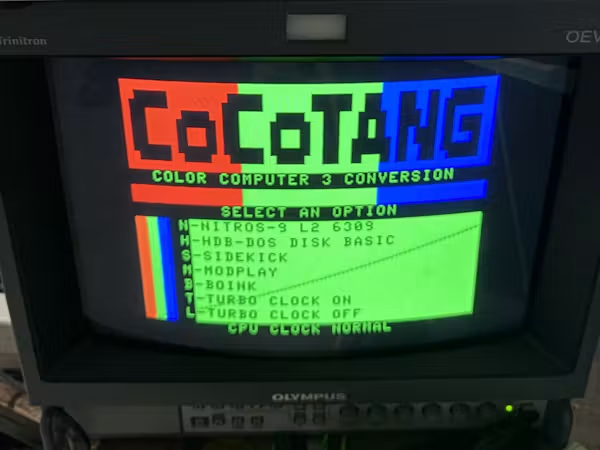
When Radio Shack introduced the Color Computer 3 in 1986, it brought some major improvements to its popular line of home computers. With better graphics, support for more memory, and an improved video system, the CoCo 3 was a big step up from its predecessors. Unfortunately, owners of the original CoCo and CoCo 2 had no way to upgrade their existing machines. Getting those new capabilities meant buying an entirely new computer. Four decades later, developer Felipe Antoniosi is finally offering an alternative with CoCoTANG, an open source upgrade that brings many of the CoCo 3's features to older Color Computers. The project is built around a Sipeed Tang Nano 20K FPGA development board, which recreates the CoCo 3's Graphics, Interrupt, Memory Enhancement (GIME) chip in programmable logic. Rather than replacing the entire computer with an emulator, CoCoTANG works alongside the original Motorola MC6809E processor and motherboard Peripheral Interface Adapters. One of the biggest benefits of using an FPGA is that it allows for 8 MB of RAM, far more than the 512 KB an original CoCo 3 could accommodate. CoCoTANG also adds the CoCo 3's enhanced graphics capabilities, making it possible to run software that takes advantage of the newer computer's display modes. The video system gets some modern conveniences as well. HDMI output makes it possible to connect a vintage Color Computer to a modern display without hunting down an old television or monitor. Analog video options are also available, including RGB, component, and composite/S-Video, depending on the FPGA configuration. HDMI and analog outputs can even operate simultaneously if you want to drive multiple displays. Beyond graphics and memory, CoCoTANG includes a number of other useful enhancements. A Glenside-compatible IDE interface backed by a microSD card provides non-volatile storage, and expanded audio capabilities include Orchestra-90 support, stereo sound over HDMI, and emulation of the Tandy Speech/Sound Cartridge, complete with speech synthesis. As you might expect, installing CoCoTANG isn't as simple as plugging a cartridge into an expansion slot. The upgrade involves several custom circuit boards, including a main board for the original CPU and FPGA, adapters for the motherboard's Peripheral Interface Adapters, and a replacement for the original address decoder. Optional boards provide additional video connections and an HDB-DOS ROM cartridge. Only certain CoCo 2 motherboard revisions are currently supported, and CoCo 1 installations require additional modifications to address electrical noise. Some software and peripherals may also have compatibility issues, although most of the games tested so far appear to work. For anyone interested in giving their vintage Color Computer a serious upgrade, Antoniosi has published the FPGA source code, KiCad designs, PCB fabrication files, and bill of materials on GitHub . The upgrade will require some electronics experience, but if you are still running a CoCo in 2026, you probably already understand that.The CoCoTANG boot screen (📷: Felipe Antoniosi) A CoCo with the mods installed (📷: Felipe Antoniosi) Playing The Contras (📷: Felipe Antoniosi)
↑ Back to top
Originally published by Hackster News ↗
· rebuilt here from its own full-text RSS feed · all rights
remain with the publisher, please read and support them there.