Predictable AI spend in BigQuery: Introducing cost management for generative AI functions
The generative AI functions in BigQuery (AI.GENERATE, AI.IF, AI.CLASSIFY, AI.SCORE, and more) bring large language models (LLMs) directly into your SQL, so a single query can classify millions of support tickets or score each product review for sentiment. However, because these functions are billed by the token, scaling them across massive datasets highlights the importance of managing your budget proactively.
We recently announced the general availability (GA) of token-based cost management for BigQuery generative AI functions: daily quotas that let administrators set self-serve guardrails on AI token consumption, so teams can innovate while staying within your budget. In this blog, we provide an overview of cost management for BigQuery generative AI functions, walk through a few practical examples, and share resources to help you get started. Let’s jump in.
Quotas for managing costs
Four daily quotas, managed through the Google Cloud Identity and Access Management (IAM) quota system, provide controls at the project level and the per-user level. Per-user limits apply to each user within a project, not across your organization.
Quota name
Metric
Scope
Default value
AI input tokens per day
Input tokens used by the LLM
Per day, per project
200 billion
AI input tokens per day per user
Input tokens used by the LLM
Per day, per project, per user
150 billion
AI output tokens per day
Output and thinking tokens used by the LLM
Per day, per project, per project
20 billion
AI output tokens per day per user
Output and thinking tokens used by the LLM
Per day, per project, per user
15 billion
Key details:
-
The quotas are global. Usage is summed across all regions, so costs can't pile up unnoticed in a region you weren't watching.
-
Output quotas include "thinking" tokens. Reasoning tokens count toward your output quota, just as they count toward your Gemini platform bill.
Which functions are covered?
The quotas apply to these BigQuery functions that perform LLM-backed generation:
-
AI.GENERATE_TEXT(and its aliasML.GENERATE_TEXT)
What's not covered: Embedding functions such as AI.GENERATE_EMBEDDING (also available as ML.GENERATE_EMBEDDING) and AI.EMBED are not subject to these quotas, because they run on different, substantially cheaper models.
Managing your quotas
Administrators can view and adjust the quotas directly in the Google Cloud console as workloads change, with no support case required.
-
Navigate to IAM & Admin → Quotas & System Limits.
-
Filter by service and select BigQuery API.
-
Sort by the Name column to bring the four AI quotas to the top.
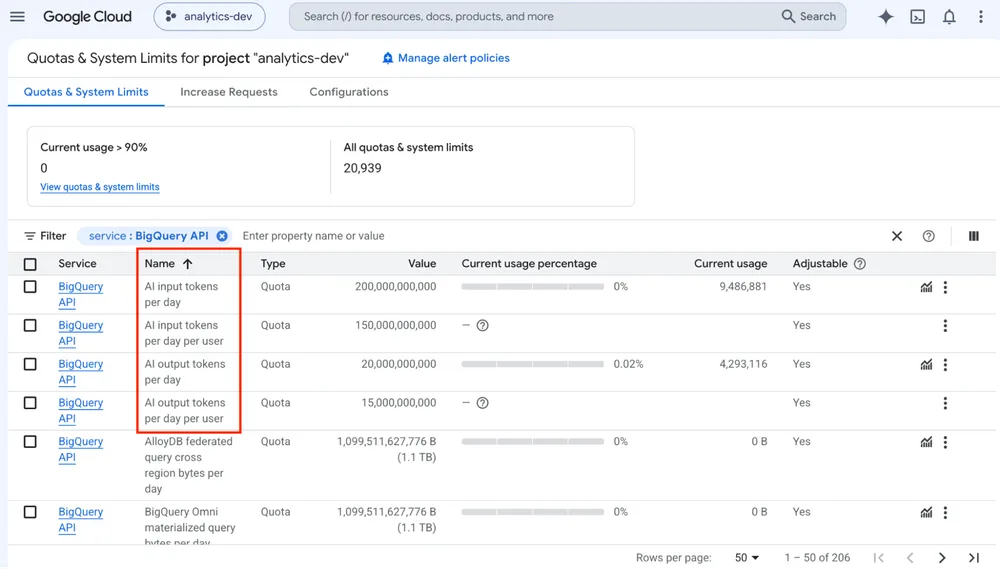
Locating the gen AI token quotas in IAM & Admin → Quotas & System Limits.
4. Find the quota, for example AI input tokens per day.
5. Open the three-dot menu and choose Edit quota.
From there:
-
To tighten cost control, lower a quota. This takes effect immediately with no approval needed.
-
To support higher usage, request an increase from the same page. Many requests are auto-approved; larger increases may go through a quick review.
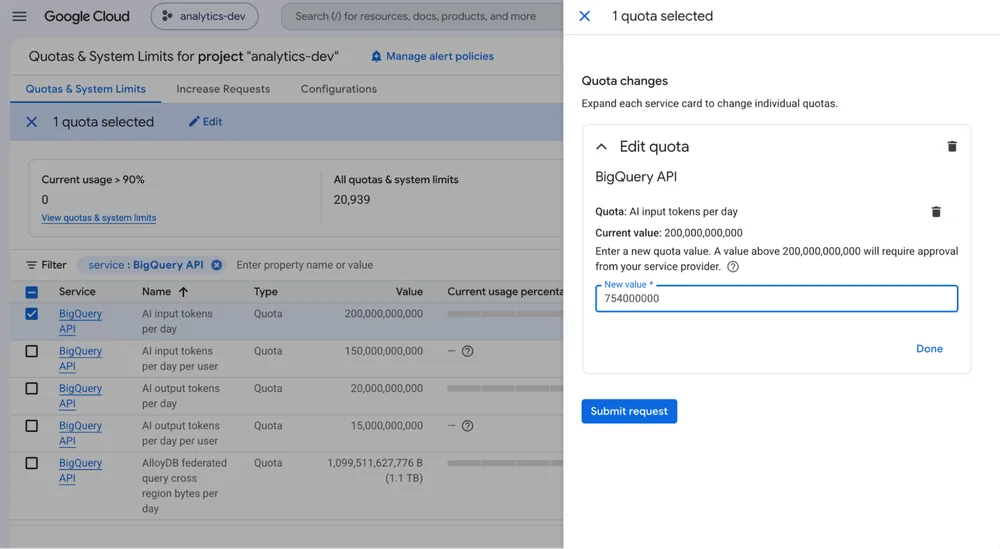
Editing a gen AI token quota in IAM & Admin → Quotas & System Limits.
You'll need the right permissions. You need one of: Owner, Editor, Quota Administrator (roles/servicemanagement.quotaAdmin), or Service Usage Admin (roles/serviceusage.serviceUsageAdmin).
Prefer automation? You can also manage these quotas programmatically through the Cloud Quotas API, the gcloud CLI, and Terraform to apply consistent guardrails across projects.
Monitoring usage
Beyond setting limits, the Quotas & System Limits page displays your historical token consumption so you can quickly detect spikes and right-size your budgets. Use these trends to see how new generative AI workloads and data pipelines affect your overall token usage.
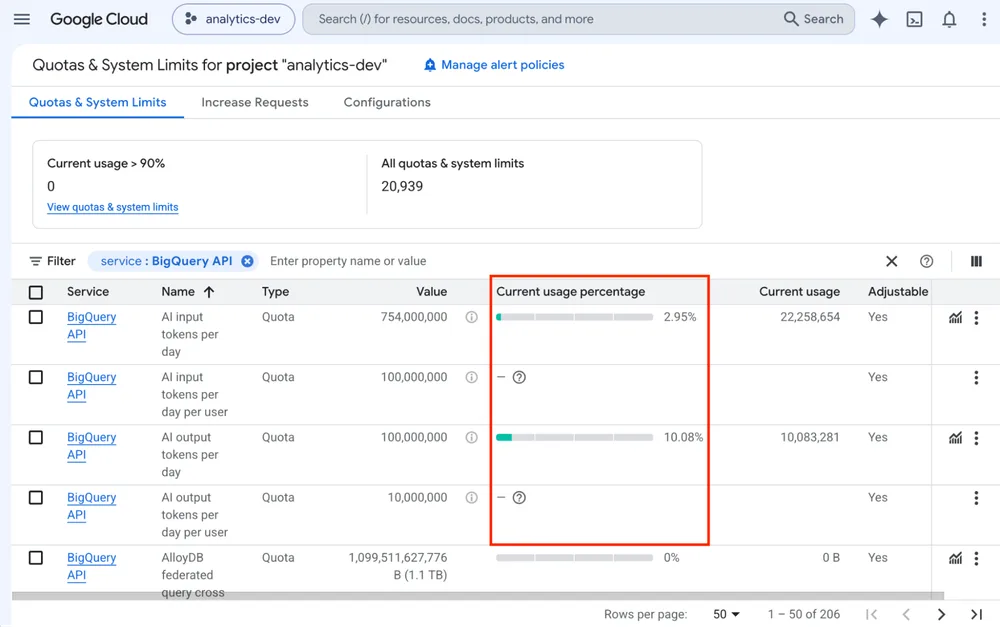
Daily project-level token usage for a gen AI token quota in IAM & Admin → Quotas & System Limits.
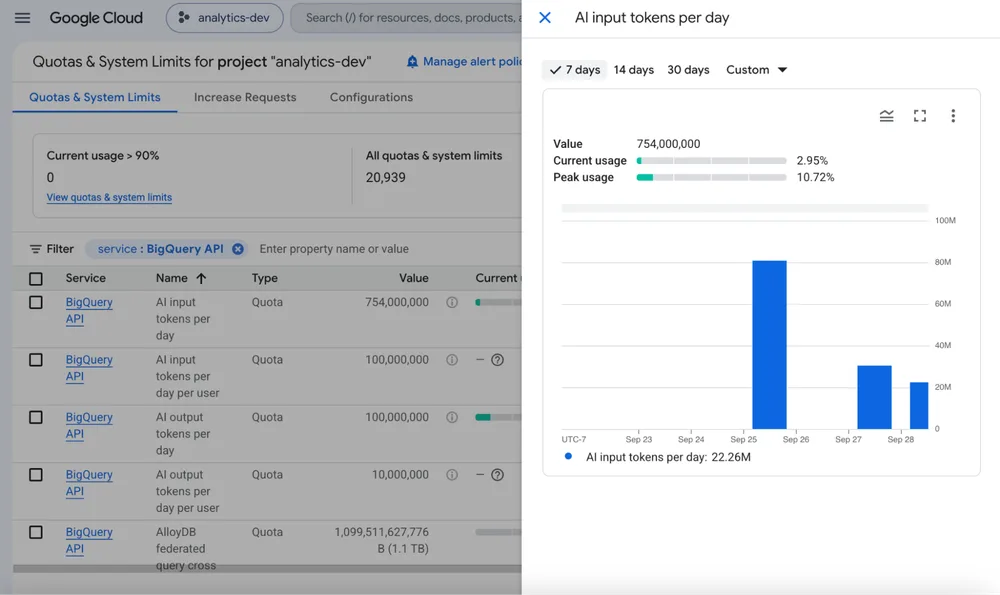
Longer-term usage graph with selectable 7-day, 14-day, 30-day, and custom ranges.
For a step-by-step walkthrough, see the BigQuery documentation on controlling costs with token quotas.
Token quotas vs. billing spend caps
Token quotas aren't the only cost guardrail in Google Cloud.
-
Token quotas (this feature) are preventive and AI-specific. BigQuery tracks token usage during query execution and stops work close to the limit, with separate limits per project and per user.
-
Cloud Billing spend caps operate on dollars at the project and service level and can automatically block usage when a threshold is reached. They're a broad, financial backstop rather than a precise usage control, and because enforcement is not instant, some overages are incurred.
Use token quotas as your first line of defense for AI spend, and a spend cap as a project-wide safety net.
How enforcement works
Quotas are enforced by stopping work rather than letting a query run past your limit. A query is rejected up front with a QuotaExceeded error only if a quota it needs is already exhausted. Otherwise, it starts, and if a quota runs out mid-query, BigQuery stops sending new LLM calls:
-
Functions that support
max_error_ratio(such asAI.IF) return partial results if unprocessed rows stay within the ratio, and otherwise fail. -
General-purpose functions (such as
AI.GENERATE) still succeed. Skipped rows have no generated value, and theirstatusfield contains the quota-exceeded error.
For details, see quota enforcement behavior in the documentation.
Sizing your input data: AI.COUNT_TOKENS
To choose quota values, it helps to know how much text your workloads send to a model. The AI.COUNT_TOKENS function helps with this.
AI.COUNT_TOKENS returns the number of tokens a model's tokenizer produces for a text string, without making a billable generation call. Run it over a column to measure your input data:
The count is a lower bound on input tokens. It doesn't include output or thinking tokens, the instructions each AI function adds around your input, or non-text inputs such as images. Use it to:
-
Gauge the input side of a workload before you launch it.
-
Right-size your quotas together with a small sample run that measures actual input and output usage.
-
Translate tokens into dollars using the published Gemini platform pricing for your model.
From tokens to budget: a worked example
Suppose you want to keep a project's daily AI spend around $100 with the Gemini 3.1 Flash-Lite model. As of today's published pricing (BigQuery processes in batch which provides a 50% discount):
-
Input tokens: $0.125 per 1 million tokens
-
Output tokens (response + reasoning): $0.75 per 1 million tokens
If a small sample run shows an average 100:1 input-to-output token ratio, you can solve for a daily budget:
code_block <ListValue: [StructValue([('code', 'Cost: 0.125 × I + 0.75 × O = 100 (I, O in millions of tokens)\r\nRatio: I = 100 × O'), ('language', ''), ('caption', <wagtail.rich_text.RichText object at 0x7f373a419850>)])]>Solving gives about 754 million input tokens and 7.54 million output tokens per day. Set AI input tokens per day and AI output tokens per day to these values to hold the project near $100/day. If a project uses models with different prices, budget per model or blend the rates.
Best practices for managing AI cost
-
Start with per-user quotas. They stop one user or runaway experiment from draining the project's budget.
-
Measure before you scale. Use
AI.COUNT_TOKENSto size your input, then check a small sample run in the usage chart before setting limits. -
Mind the output side. Output tokens cost more. Where a function accepts
max_output_tokens, set it to bound generation length. -
Monitor and iterate. Adjust limits as real usage and budgets change.
Get started
Token-based cost management is available now. To begin:
-
Open IAM & Admin → Quotas & System Limits in the Google Cloud Console and filter by BigQuery API.
-
Review the four AI-related token quotas and set limits that match your budget.
-
Use
AI.COUNT_TOKENSto size your input data.
For the full details, see the documentation on controlling generative AI costs.
With token-based guardrails in place, your teams can use generative AI in BigQuery with the cost predictability your organization needs.