Experimenting with ClusterNetworkPolicy in GKE
Standard Network Policies limit you to applying policies at the namespace level, but ClusterNetworkPolicy (CNP) lets you apply granular networking policies across an entire cluster. When you use CNP, you can easily scale security and governance policies. Recently, I experimented with this functionality in Google Kubernetes Engine (GKE) and saw the benefits for myself.
In this post, we'll explore using CNP to control traffic to an LLM and cluster. If you want to jump right into a hands-on lab, check out this Codelab: Secure AI Inference Workloads with GKE ClusterNetworkPolicy.
How CNP works
CNP follows a three-tier flow with a precedence match:
-
Admin tier (top precedence): Cluster administrator enforces mandatory security rules that can't be bypassed (for example, blocking metadata access).
-
Network policy tier (middle precedence): Standard namespace-scoped policies that are managed by application teams to control ingress and egress for their microservices.
-
Baseline tier (bottom precedence): Cluster administrator establishes fallback defaults (for example, a default-deny posture across namespaces).
Design pattern example
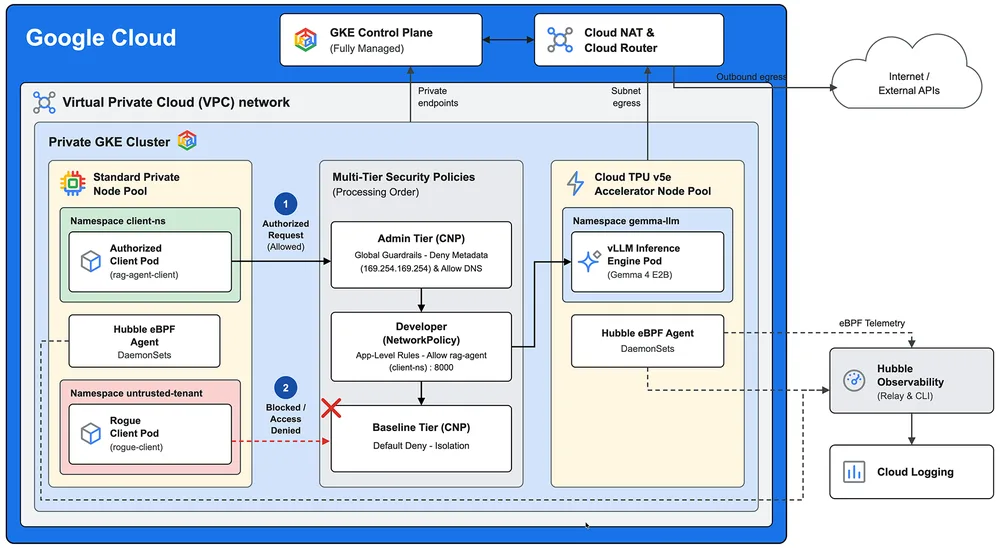
The aim of the experiment in the Codelab is to restrict traffic to the LLM namespace, allow only authorized clients, and prevent cluster-wide access to the metadata API except for DNS port 53. It uses these services:
-
Virtual Private Cloud (VPC): Provides private networking, subnets for pods and services, and secure outbound egress via Cloud NAT.
-
TPU v5e: High-efficiency accelerator hardware (2x2 topology) running optimized model inference.
-
GKE: Managed Kubernetes platform that's powered by GKE Dataplane V2 (eBPF) to enforce multi-tier networking policies.
-
Gemma 4 (google/gemma-4-E2B-it): Lightweight open model served with vLLM to act as a sensitive AI workload.
-
ClusterNetworkPolicy (CNP): Cluster-wide policies that let administrators enforce mandatory administrator and baseline guardrails across all namespaces.
-
NetworkPolicies: Standard namespace-scoped rules that let developers grant access to authorized clients.
-
Cloud Logging / GKE Network Policy Logging: Captures real-time packet verdicts (
allow/deny) and policy audit trails.
Putting it together: Setup overview
Setting up this environment begins with building a custom private network infrastructure and deploying your TPU-enabled clusters:
-
Custom VPC & Cloud NAT: Establish a custom VPC with a dedicated subnet that hosts primary nodes, plus secondary CIDR IP address ranges for GKE pods (
10.20.0.0/16) and services (10.30.0.0/20). A Cloud Router and Cloud NAT are configured to handle secure outbound egress for nodes while blocking inbound internet exposure. -
GKE Standard cluster: Spin up a Standard GKE cluster running GKE Dataplane V2 (
ADVANCED_DATAPATH). GKE Dataplane V2 acts as the core engine that leverages eBPF under the hood to enforce both standard and cluster-scoped policies dynamically. -
Dedicated TPU v5e node pool: Provision a node pool featuring
ct5lp-hightpu-4tmachines arranged in a 2x2 topology slice. The nodes carry a dedicated taint (google.com/tpu=present:NoSchedule) to ensure that only accelerator workloads run on them. -
Deploying the Gemma 4 workload: Isolate the pods by creating three distinct namespaces:
gemma-llm(tier: ai-core): Serves the lightweight Gemma 4 model using the high-performancevllm/vllm-tpu:latestengine on port 8000.client-ns(tier: app-frontend): Runs the authorized chat client that must query the model.untrusted-tenant(tier: untrusted): Represents an unauthorized probe container simulating a rogue client.
Securing the LLM and metadata: Code walkthrough
By default in Kubernetes, all cross-namespace and egress traffic is open. To enforce a defense-in-depth posture, we apply network policies across the GKE evaluation tiers.
Step 1: Establish zero-trust posture (baseline tier)
To deny all unauthorized ingress cluster-wide, the cluster administrator applies a ClusterNetworkPolicy at the baseline tier. This tier acts as a fallback safety net.
code_block <ListValue: [StructValue([('code', 'apiVersion: policy.networking.k8s.io/v1alpha2\r\nkind: ClusterNetworkPolicy\r\nmetadata:\r\n name: baseline-default-deny\r\nspec:\r\n tier: Baseline\r\n priority: 1000\r\n subject:\r\n namespaces: {}\r\n ingress:\r\n - name: allow-dns-ingress\r\n action: Accept\r\n from:\r\n - namespaces: {}\r\n protocols:\r\n - udp:\r\n destinationPort:\r\n number: 53\r\n - tcp:\r\n destinationPort:\r\n number: 53\r\n - name: baseline-deny-cross-ns\r\n action: Deny\r\n from:\r\n - namespaces: {}'), ('language', ''), ('caption', <wagtail.rich_text.RichText object at 0x7fc2dd824e10>)])]>How it works
-
Precedence placement: Setting
tier: Baselineplaces this policy at the very bottom of the GKE evaluation chain, and thepriority: 1000value orders it within that tier. It only processes traffic that hasn't matched a rule in any higher tier. -
Global target: Specifying
subject.namespaces: {}ensures that this fallback applies globally to every pod in every namespace. -
DNS isolation exemption: The first ingress rule accepts incoming DNS traffic on TCP and UDP port 53. Without this explicit exemption, cluster-wide DNS resolution would fail.
-
Fallback deny: The second rule matches any incoming pod-to-pod connection attempt and drops it. At this stage, both the
client-nsanduntrusted-tenantnamespaces are blocked from contacting Gemma.
Step 2: Delegate access to developers (networkpolicy tier)
With the baseline default-deny active, the application team that manages gemma-llm can safely delegate access to legitimate clients. They define a standard namespace-scoped NetworkPolicy to allow incoming port 8000 traffic from rag-agent pods in the client-ns namespace.
How it works
-
Developer control: This resource resides within the
gemma-llmnamespace and it's managed directly by the developer, matching the GKE focus on operational separation. -
Middle precedence matching: Standard Kubernetes
NetworkPoliciesmap directly to the NetworkPolicy Tier. Because this tier is evaluated before the baseline tier, incoming TCP packets from the authorized client to port 8000 match this rule and are immediately accepted. -
Fall-through block: Connections that originate from the
untrusted-tenantnamespace fail to match this rule, pass through to the baseline tier, and are dropped.
Step 3: Enforce global egress guardrails (admin tier)
By default, Pods can query the GKE link-local Compute Engine metadata server (169.254.169.254). Those queries expose instance metadata and potentially high-privilege service account tokens. To lock this down, the cluster administrator applies an egress guardrail at the highest tier in the GKE hierarchy.
How it works
-
Admin tier precedence: Deploying this policy in the admin tier ensures that it's evaluated first, and priority 10 orders it within that tier. GKE processes this policy before standard NetworkPolicies and baseline rules.
-
Controlled delegation: The
delegate-all-ingressanddelegate-other-egressrules have anaction: Passdirective that instructs the engine to forward evaluation down to the next tier for remaining in-cluster traffic. -
Inviolable guardrail: When any pod attempts to query
169.254.169.254/32on non-DNS ports, the query matches theblock-metadata-server-globalrule and it's dropped. Because this drop occurs at the top admin tier, it can't be bypassed or overridden, even if a namespace developer deploys an allow-all egress policy.
Verifying with Observability for GKE
Verifying and auditing security policies is straightforward using the built-in telemetry capabilities of GKE Dataplane V2:
-
Hubble eBPF streams: Provides real-time, kernel-level packet inspection without injecting sidecars. Administrators can stream live network flows to observe policy verdicts as they happen, making it easy to validate allowed communication paths and identify dropped packets immediately.
-
GKE Network Logging and Cloud Logging: Automatically exports structured connection telemetry and policy enforcement verdicts directly into Cloud Logging. Teams can filter and alert on policy decisions using attributes such as
disposition="deny", source/destination namespaces, andjsonPayload.policies[0].nameto maintain audit compliance and investigate blocked connection attempts.
CNP can be useful and, as always, when you use it in your production environment, you'll need to plan and design the rules based on your setup.
Next steps
Take a deeper dive and find more information on these features:
Want to ask a question, find out more, or share a thought? Connect with me on LinkedIn!