SCKit abuses ScreenConnect to deploy remote access and target technician sessions
- ScreenConnect architecture and attack surfaces
- Attack chain overview
- Mitigation and protection guidance
- Indicators of compromise and supporting artifacts
- References
- Learn More
Beginning on November 11, 2026, ConnectWise reported an active campaign of a threat actor gaining unauthorized access to cloud-hosted ConnectWise ScreenConnect instances belonging to managed service providers (MSPs). Microsoft Threat Intelligence has confirmed ConnectWise’s reported activity and we have also observed threat actors abusing ScreenConnect, a legitimate remote-support application, to install unauthorized remote-access clients and deploy a malicious worm, SCKit, on ConnectWise customer managed endpoints.
Additionally, Microsoft analyzed the malicious worm’s behavior: deployment starts with commands issued through ScreenConnect to silently install an identical client connected to threat actor-controlled infrastructure. A batch launcher retrieves a PowerShell decoder that decrypts and extracts SCKit using device-specific key material. The toolkit establishes persistence through scheduled tasks and registry Run entries and deploys RelayTrap, a component designed to deliver a malicious payload to a connecting technician.
We have identified that the worm targets IT support technician workstations using the hijacked authenticated ScreenConnect Session and uses the victim’s management console to distribute payloads to other managed devices. The resulting access to either target enables threat actors to remotely administer affected endpoints, execute commands, and deploy further tools independently of the legitimate support instance.
Defenders should investigate technician workstations and downstream affected endpoints. Removing an unauthorized client alone does not remove the toolkit’s persistence or invalidate exposed web sessions. In this blog, we examine SCKit’s attack chain and payload components and provide mitigation guidance, indicators of compromise, and Microsoft Defender XDR advanced hunting queries to help organizations identify and disrupt this activity.
ScreenConnect architecture and attack surfaces
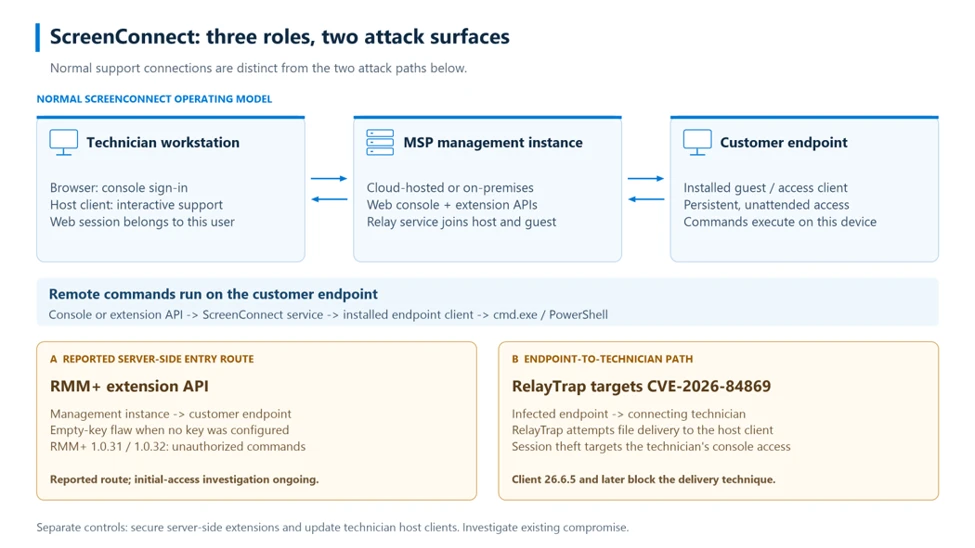
ScreenConnect, formerly ConnectWise Control, is a remote-support and access platform used by MSPs to administer customer devices, often alongside remote monitoring and management (RMM) software. Its operating model has three parts:
- Management instance. A cloud-hosted or on-premises ScreenConnect server provides the web console and manages sessions. Its relay service carries communication between the technician and endpoint clients.
- Technician workstation. Support staff sign in to the console through a browser and launch a local host client for interactive support.
- Customer endpoint. An installed guest, or access, client maintains unattended access and executes commands delivered through ScreenConnect.
An Access session provides persistent, unattended access through the installed client. A Support session is a temporary connection that an end user joins for assistance. ScreenConnect also supports remote commands from the web console without an interactive technician session. The endpoint client receives the command and runs it on the customer device; the technician workstation is not an intermediary for that execution.
Reported server-side entry through extensions
Extensions are add-ons installed on the ScreenConnect server to add features or integrate with other products, including ticketing and RMM tools. ConnectWise Automate was formerly named LabTech; Labtech Plus is a third-party extension, not the Automate product itself. The RMM+ extension family exposes remote-command APIs protected by a separately configured passphrase rather than the technician’s normal console sign-in.
ConnectWise’s advisory describes a reported authentication flaw in RMM+ versions 1.0.31 and 1.0.32: when no access key was configured, the extension accepted an empty key. In that configuration, an unauthorized caller could submit commands to the server’s API for delivery to managed endpoints without a normal ScreenConnect user sign-in. ConnectWise is investigating extension abuse as an initial-access route; the entry method for the reported campaign remains under investigation.
A separate path from customer endpoints to technicians
SCKit is a malware toolkit that includes RelayTrap, a malicious replacement for the ScreenConnect client on an affected customer endpoint. RelayTrap is designed to deliver a payload to a technician’s workstation when they connect for support. ConnectWise states that the fix for CVE-2026-84869 blocks the toolkit’s attempted endpoint-to-technician spread. This client-side attack path is separate from the server-side access used to deploy SCKit.
Attack chain overview
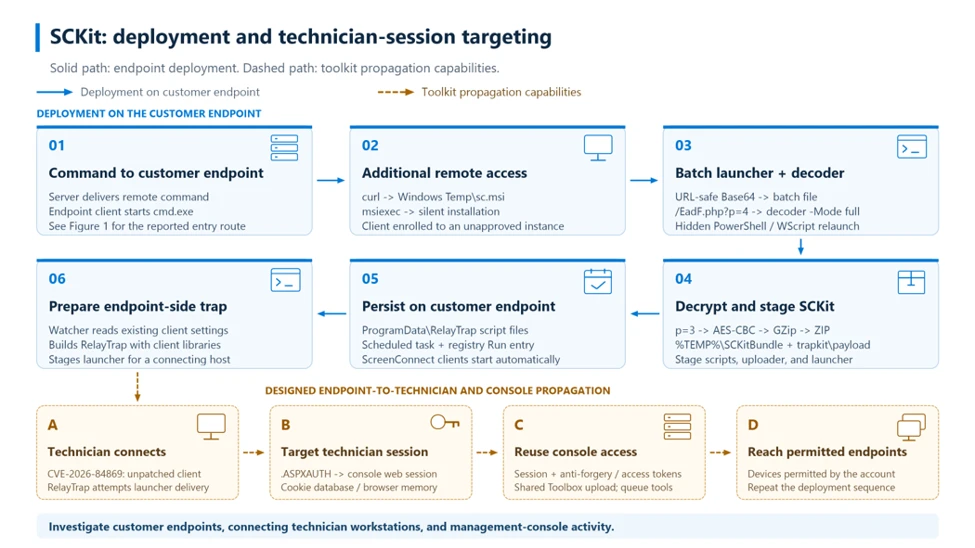
The deployment sequence below runs on the customer endpoint. It establishes a separate remote-access connection and prepares the scripts and RelayTrap component that target a later technician
1. ScreenConnect commands install an additional client
The threat actor uses the MSP’s ScreenConnect management instance to direct the installed endpoint client to start cmd.exe. That local process invokes curl.exe to download an MSI over HTTP from an attacker-controlled ScreenConnect server. The command requests /Bin/ScreenConnect.ClientSetup.msi with access-session parameters and a c=Exploited<N> marker (c=Exploited9 in the illustrated command), and saves the installer to C:\Windows\Temp\sc.msi.
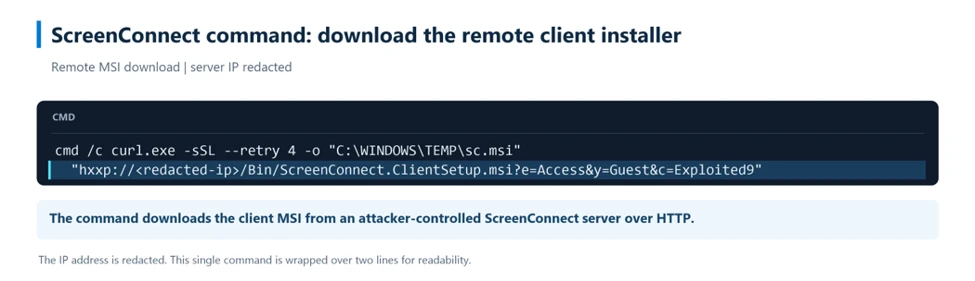
Windows Installer then installs the package silently on that endpoint, without restarting it, using /i, /qn, and /norestart. The added client connects to an attacker-controlled ScreenConnect instance, creating a remote-access channel separate from the MSP’s approved instance. Securing access to the legitimate console does not remove this additional client or its connection.
2. A batch launcher retrieves the PowerShell decoder
Further commands on the customer endpoint stage the toolkit. A PowerShell command decodes a URL-safe Base64 string and writes the result to a batch file in Windows Temp. The batch sets BATPATH to its own location, downloads the decoder from ns[.]mo7sen[.]dev/EadF.php?p=4, and starts it with -Mode full.
The decoder reads BATPATH, or falls back to SCKIT_SELF, to locate the launcher. Its hidden-relaunch branch creates a VBScript wrapper and runs it through wscript.exe to start the same batch without a visible window.
The scripts use the following p values at the same server path to request individual components:
3. The decoder decrypts and extracts the SCKit bundle
The decoder reads MachineGuid from HKLM\SOFTWARE\Microsoft\Cryptography and includes it as the m request parameter. The response provides a Base64-encoded body and two headers, X-Lab-Half and X-Lab-Salt.
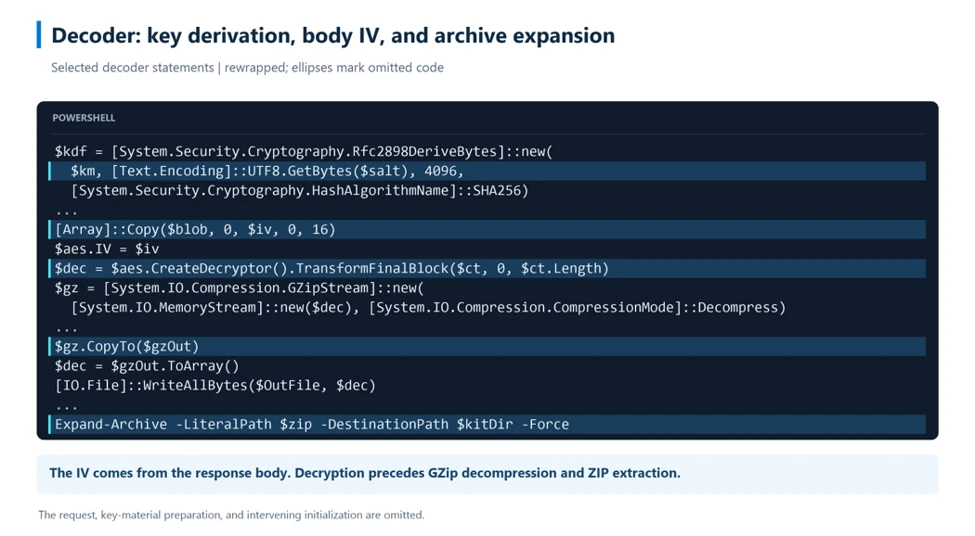
To derive the decryption key, the decoder hashes the UTF-8 machine identifier with SHA-256, XORs that hash with 32 bytes decoded from X-Lab-Half, and appends the machine-identifier bytes to the recovered secret material. PBKDF2-HMAC-SHA256 then derives a 32-byte key using the response salt and 4,096 iterations.
The decoder uses the first 16 bytes of the decoded response body as the initialization vector (IV). It decrypts the remaining bytes using AES-256-CBC with PKCS7 padding, decompresses the plaintext with GZip, and writes the resulting ZIP archive. The archive is then extracted to %TEMP%\SCKitBundle.
In full mode, the decoder prepares %TEMP%\SCKit\trapkit\payload and stages the watcher, installer, alert script, and RelayTrap.cs. It also copies its batch launcher into the payload directory for RelayTrap to distribute. The copied launcher retrieves the decoder and starts toolkit deployment.
The decoder also stages ToolboxRelayUploader.exe for console-based payload distribution and retrieves sqlite3.exe for browser-cookie queries if a suitable copy is absent. It includes two launch paths: full mode starts the distribution script without a separate configuration file and supplies a local script path; the other path stages a helper and lab-context.json and passes -SkipLocalExecution.
4. Additional component: PowerShell script loader
Alongside the bundle decoder, SCKit includes a separate loader for encrypted PowerShell scripts. Unlike the decoder, which retrieves and expands an archive, this component requests a script using p=1 with the machine identifier. It applies the same secret-recovery, PBKDF2, AES-CBC, and GZip operations, but uses a salt embedded in its source rather than one supplied in a response header.
After decompression, the loader converts the bytes to UTF-8 text and writes %TEMP%\k<32-hex>.ps1, using a newly generated random GUID for the filename. It starts a hidden PowerShell process to run the file with the forwarded arguments, then attempts to remove the script after the child process exits.
5. RelayTrap adds persistence and targets connecting technicians
On the customer endpoint, persistence keeps the toolkit available for a later support connection. The deployment places scripts under C:\ProgramData\RelayTrap. The RelayTrapLiteAlert value in the machine-wide CurrentVersion\Run key launches an alert script at user logon. A scheduled task starts the watcher with a payload filename and lists of client identifiers and relay hosts to exclude. The -PollSeconds 10 argument configures the watcher to poll every 10 seconds.
The watcher enumerates ScreenConnect client services and reads their executable paths and connection parameters. For each client, its build routine creates a directory under trapbins, copies libraries from that client’s installation, and uses the .NET C# compiler to build RelayTrap.exe. It checks for changes to the source or client libraries before rebuilding.
RelayTrap is designed to reuse the customer endpoint’s ScreenConnect connection details in place of its normal client. When a technician connects with a vulnerable host client, RelayTrap attempts to deliver the staged batch launcher through that session. The launcher retrieves the same decoder, extending the toolkit’s deployment design from the customer device to the technician workstation. Configured skip lists exclude specified client identifiers and relay hosts from processing.
ScreenConnect services are also configured for automatic startup. Registry writes target Microsoft Defender Antivirus path exclusions for staged MSI copies and CWInstall_…\Installer.ps1. The installer configuration lists sc[.]payproofkit[.]com and cdn007-digitaldownloads[.]com as additional ScreenConnect MSI sources. A subsequent curl.exe command downloads another client installer from sc[.]payproofkit[.]com.
6. Browser access targets authenticated ScreenConnect sessions
SCKit also targets the technician’s browser, which is used to sign in to the management console. The browser-access code searches Chrome, Edge, Opera, and Opera GX profiles for cookies named .ASPXAUTH. Its database route identifies associated hosts and queries encrypted cookie values. It copies cookie databases and their supporting files, with a volume-shadow-copy fallback for locked databases. The decryption code uses the Chromium master key and the Windows Data Protection API (DPAPI) in the current user’s context, with AES-GCM routines for v10 and v11 cookie values.
The memory-scanning route first examines browser network-service processes identified by network.mojom.NetworkService in their command lines. An embedded C# scanner uses OpenProcess, VirtualQueryEx, and ReadProcessMemory to inspect readable committed memory regions for cookie strings and nearby host strings. If the initial scan finds no candidates, it scans other browser processes.
The console-distribution component is designed to combine an authentication cookie with the required anti-forgery and access tokens, enumerate accessible sessions, upload a payload using ToolboxRelayUploader.exe, and queue execution through the Shared Toolbox. The workflow also includes removing the uploaded Toolbox item after distribution.
This component targets the technician’s management-console access, rather than only the original customer device. The account’s permissions determine which additional sessions and devices the distribution workflow can reach.
7. Cleanup and redeployment
The toolkit’s cleanup script places a stop marker in the trap directory. It removes trap-related tasks, services, processes, Run entries, and files, and restores ScreenConnect client services unless client removal was requested. It then removes any remaining stop marker to allow a newly deployed watcher to run.
After running the cleanup script, the decoder’s cleanup mode starts the bundled dropper again unless -NoReArm is set. Cleanup therefore also serves as a path to redeploy the toolkit.
Mitigation and protection guidance
Secure ScreenConnect administration and technician clients
Address the server-side extension APIs and technician clients separately. Extension authentication and client-side file transfer are different attack surfaces; securing one does not remove the other or an existing endpoint installation.
- Keep the identified extensions disabled. Follow the vendor advisory for Labtech Plus, RMM Plus, RMM+, RMM Plus Password Link, and RMM+ Password Link. Review their installation and configuration history alongside administrative access.
- Update technician clients separately from the console. ConnectWise states that ScreenConnect client 26.6.5 and later block the toolkit’s attempted endpoint-to-technician transfer technique. The fix for CVE-2026-84869 was released on September 8, 2026. Verify each technician client’s installed version; a cloud-console update does not automatically update those clients. The vendor bulletin also describes temporary file-transfer restrictions while updates are pending.
Remove established access
- Investigate through a separate channel. Use Microsoft Defender for Endpoint live response or another approved out-of-band method instead of ScreenConnect on a suspected affected device. Isolate affected endpoints and include connecting technician workstations in scope.
- Preserve console and endpoint evidence. Retain extension, authentication, Run Command, and Toolbox records together with process, file, task, and registry history. Review Toolbox history for tools removed after use, and inspect queued commands and tools before reconnecting devices.
- Revoke exposed sessions from a clean device. Invalidate affected ScreenConnect web sessions and associated identity-provider sessions, rotate exposed credentials, and review accounts and permissions. Password changes alone do not address every existing session.
- Remove persistence and unapproved clients. Validate each client’s enrolled instance and relay destination before removing it. Remove malicious tasks, Run values, trap files, and unauthorized exclusions through approved response tooling. Do not use a cleanup script recovered from the kit as a remediation tool.
- Verify the complete state before restoring connectivity. Confirm approved services and destinations, effective antivirus settings, and the absence of re-created tasks or scripts. Review tamper-protection events when investigating exclusion changes. Rebuild devices when integrity cannot be established.
Keep Microsoft Defender Antivirus, cloud-delivered protection, and tamper protection enabled. Verify that devices meet the requirements for protecting antivirus exclusions. Maintain an inventory of authorized remote-management instances and use application control to restrict unapproved software.
Microsoft Defender XDR detections
Microsoft Defender XDR customers can use the following Microsoft Defender for Endpoint alert titles to investigate activity associated with this threat. Review related alerts together with device timelines and ScreenConnect audit records to trace command execution, persistence, browser-data access, and network connections.
– Trojan:Win32/SuspScreenConnectDownload.EA – Trojan:Win32/Tikise.EA!cmd
– Trojan:Win32/SuspScreenConnectDownload.EA
Microsoft Defender for Endpoint
– Suspicious command execution via ScreenConnectPersistenceAdditional ScreenConnect clients and automatic-start services provide remote access. The RelayTrapLiteAlert Run entry and scheduled tasks launch RelayTrap scripts.Microsoft Defender Antivirus
– Trojan:PowerShell/RelayPersist.FC!MTB
Microsoft Defender for Endpoint
– Suspicious installation of remote management software
– Anomaly detected in ASEP registry
– Suspicious Scheduled Task Process LaunchedDefense evasionThe loader attempts to remove its temporary PowerShell payload. Registry writes target Microsoft Defender Antivirus path exclusions.Microsoft Defender Antivirus
– Trojan:PowerShell/SCRelayTrap.EC!MTB
Microsoft Defender for Endpoint
– Possible PowerShell indicator removal
– Suspicious Microsoft Defender Antivirus exclusionCredential accessThe browser component queries .ASPXAUTH cookies, scans browser memory, and uses DPAPI in its decryption routines.Microsoft Defender Antivirus
– Trojan:BAT/Tikise.A
– Trojan:BAT/Tikise.B
– Trojan:BAT/Tikise.C
– Trojan:BAT/Tikise.D
– Trojan:PowerShell/Tikise.A
– Trojan:PowerShell/Tikise.B
– Trojan:PowerShell/Tikise.C
– Trojan:PowerShell/Tikise.D
– Trojan:PowerShell/Tikise.E
– Trojan:PowerShell/Tikise.F
Microsoft Defender for Endpoint
– Possible theft of passwords and other sensitive web browser information
– Suspicious DPAPI ActivityCommand and controlPowerShell and curl.exe retrieve the decoder, toolkit components, and client installers from campaign infrastructure.Microsoft Defender for Endpoint
– Command-line process communicating with malicious network endpoint
– Powershell made a suspicious network connectionMultiple tacticsIntrusion activity spans remote commands, client installation, persistence, and security-setting changes.Microsoft Defender Antivirus
– HackTool:Win32/ToolboxRelayUploader
– Trojan:PowerShell/ScreenConnect.SC!MTB
– Trojan:PowerShell/ScreenConnect.DC!MTB
Microsoft Defender for Endpoint
– Potential human-operated malicious activity
Threat intelligence reports
Microsoft Defender XDR customers can use the following threat analytics report to get the latest intelligence on SCKit and the abuse of ScreenConnect, including protection status, affected assets, and recommended actions for their environment.
Microsoft Defender XDR Threat analytics and Secure Now
Customers can access the threat analytics report: SCKit abuses ScreenConnect to deploy remote access and target technician sessions
Customers can also access recommended controls and guidance on Secure Now.
Advanced hunting queries
Each query below runs independently and uses a 14-day lookback. Adjust the time range to the investigation window and available retention, and correlate results with approved administrative activity.
Connections to campaign infrastructure
Find connections to the listed domains and IP addresses. Review the full destination, initiating process, and approved remote-support infrastructure for each match.
DeviceNetworkEvents
| where Timestamp > ago(14d)
| where RemoteUrl has_any ( "ns.mo7sen.dev", "sc.payproofkit.com", "newnewnew.gotdns.org", "soxnewwork.homedns.org", "cdn007-digitaldownloads.com") or RemoteIP in ("185.99.255.28", "155.94.150.39")
| project Timestamp, DeviceId, DeviceName, RemoteUrl, RemoteIP, InitiatingProcessFileName, InitiatingProcessCommandLine, ReportId
Toolkit command lines and cookie-query activity
Find command lines containing distinctive toolkit names, staging paths, installer markers, or cookie-query strings.
DeviceProcessEvents
| where Timestamp > ago(14d)
| where ProcessCommandLine contains "/EadF.php" or ProcessCommandLine contains "SCKit" or ProcessCommandLine contains "RelayTrap" or ProcessCommandLine contains "Panel-Lateral" or ProcessCommandLine contains "ToolboxRelayUploader" or ProcessCommandLine contains ".ASPXAUTH" or ProcessCommandLine contains "c=Exploited"
| project Timestamp, DeviceId, DeviceName, FileName, ProcessCommandLine, InitiatingProcessFileName, ReportId
Known installer, archive, and uploader files
Find file events for the sc.msi package, staged ZIP, and uploader using their SHA-1 hashes. The query uses SHA-1 because SHA256 is usually unpopulated in DeviceFileEvents. Combine hash matches with command-line and persistence findings.
DeviceFileEvents
| where Timestamp > ago(14d)
| where SHA1 in~ ( "0be01e7bd69cfdd222645d49bb5ad9961372fef2", "3f81c9c874a896c46e4bccea2fad2eaa3d9f2054", "13ce33b19daee3963f7e15d461b191c38f6bc0d3")
| project Timestamp, DeviceId, DeviceName, FileName, FolderPath, SHA1, InitiatingProcessFileName, ReportId
Registry values referencing RelayTrap
Find writes to the RelayTrapLiteAlert value or values containing RelayTrap. Review the registry key, value data, and initiating process.
DeviceRegistryEvents
| where Timestamp > ago(14d)
| where ActionType == "RegistryValueSet"
| where RegistryValueName =~ "RelayTrapLiteAlert" or RegistryValueData contains "RelayTrap"
| project Timestamp, DeviceId, DeviceName, RegistryKey, RegistryValueName, RegistryValueData, InitiatingProcessFileName, ReportId
RelayTrap scheduled-task events
Find scheduled-task events containing RelayTrap or TrapWatch. Inspect the task definition to identify its triggers, executable, and arguments.
DeviceEvents
| where Timestamp > ago(14d)
| where ActionType contains "ScheduledTask"
| where AdditionalFields contains "RelayTrap" or AdditionalFields contains "TrapWatch"
| project Timestamp, DeviceId, DeviceName, ActionType, AdditionalFields, InitiatingProcessFileName, ReportId
Microsoft Defender Antivirus path-exclusion writes
Find Microsoft Defender Antivirus path-exclusion registry writes. Review changes naming Windows Temp, ConnectWiseControl_, CWInstall_, or RelayTrap, and verify their authorization and effective policy.
DeviceRegistryEvents
| where Timestamp > ago(14d)
| where ActionType == "RegistryValueSet"
| where RegistryKey contains @"\Windows Defender\Exclusions\Paths"
| project Timestamp, DeviceId, DeviceName, RegistryKey, RegistryValueName, RegistryValueData, InitiatingProcessFileName, ReportId
SCKit – Generated PowerShell Loader Artifacts
Identifies temporary PowerShell files matching the k<32-hex>.ps1 naming pattern generated by the SCKit loader, potentially revealing staged payloads independently of known file hashes or infrastructure.
DeviceFileEvents
| where Timestamp > ago(30d)
| where FileName matches regex @"(?i)^k[0-9a-f]{32}\.ps1$"
| project Timestamp, DeviceId, DeviceName,
ActionType, FileName, FolderPath, SHA256,
InitiatingProcessFileName
Indicators of compromise and supporting artifacts
Network addresses are defanged. Use the installer hashes to locate the listed packages, then verify the client’s enrolled ScreenConnect instance and related activity. The toolkit also uses the legitimate SQLite utility; investigate its use alongside the browser-cookie queries described above.
Network infrastructure
File hashes
Hashes identify individual files. The watcher compiles RelayTrap against local client libraries, and embedded configuration changes script hashes. Use file and process behavior to investigate other builds. The table includes configuration, cleanup, and proof artifacts to support the investigation.
Client identifiers and behavioral artifacts
References
- ConnectWise security investigation and partner guidance (advisory covering the RMM+ extension authentication flaw). ConnectWise (accessed 2026-11-13)
- ScreenConnect security bulletin, 2026-09-08 (CVE-2026-84869 fix and client 26.6.5 guidance). ConnectWise (accessed 2026-11-13)
- ScreenConnect extensions. ConnectWise (accessed 2026-11-13)
- 6 tips for ConnectWise Control partners (remote commands from the web console). ConnectWise (accessed 2026-11-13)
- Requirements for protecting antivirus exclusions with tamper protection. Microsoft Learn (accessed 2026-11-13)
- Investigate entities on devices using live response. Microsoft Learn (accessed 2026-11-13)
- Take response actions on a device. Microsoft Learn (accessed 2026-11-13)
- Advanced hunting best practices in Microsoft Defender XDR. Microsoft Learn (accessed 2026-11-13)
- DeviceFileEvents table (advanced hunting schema). Microsoft Learn (accessed 2026-11-13)
Learn More
For the latest security research from the Microsoft Threat Intelligence community, check out the Microsoft Threat Intelligence Blog.
To get notified about new publications and to join discussions on social media, follow us on LinkedIn, X (formerly Twitter), and Bluesky.
To hear stories and insights from the Microsoft Threat Intelligence community about the ever-evolving threat landscape, listen to the Microsoft Threat Intelligence podcast.
Review our documentation to learn more about our real-time protection capabilities and see how to enable them within your organization.
- Learn more about securing Copilot Studio agents with Microsoft Defender
- Evaluate your AI readiness with our latest Zero Trust for AI workshop.
- Microsoft 365 Copilot AI security documentation
- How Microsoft discovers and mitigates evolving attacks against AI guardrails
- Prompt injection protection in Microsoft Defender for Office 365 – official documentation of the prompt injection protection in Microsoft Defender for Office 365.
- How Microsoft discovers and mitigates evolving attacks against AI guardrails | Microsoft Security Blog
- Manipulating AI memory for profit: The rise of AI Recommendation Poisoning | Microsoft Security Blog – a related example of an AI-era technique observed in email traffic
- Defending the inbox against prompt injection attacks | Microsoft Defender for Office 365 Blog – feature announcement introducing prompt injection protection in Microsoft Defender for Office 365.
- Learn how Microsoft is reimagining the SOC for the agentic era with ISOC in Microsoft Defender
The post SCKit abuses ScreenConnect to deploy remote access and target technician sessions appeared first on Microsoft Security Blog.