← Technology, Science & Infrastructure
▣ Distilled locally
Smart Home Control at Your Fingertips
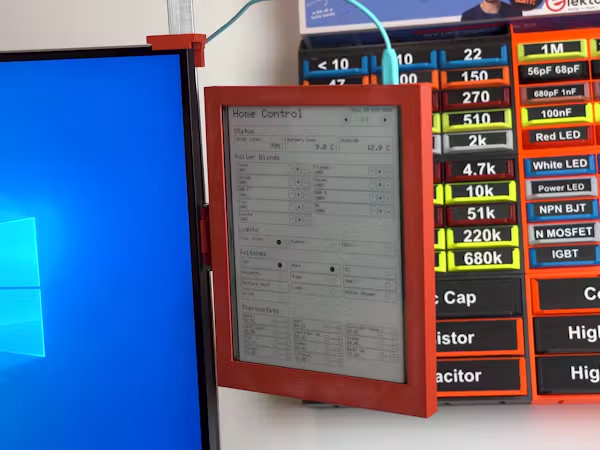
Having a house full of smart devices doesn't always make life easier if you have to dig your smartphone out of your pocket every time you want to do something as simple as close the blinds. YouTuber GreatScott! figured that since he spends a good chunk of his day sitting in front of a computer anyway, he might as well put the controls for his smart home right next to his monitor. And rather than adding another glowing screen to his desk, he built a touchscreen-equipped E Ink dashboard that integrates with Home Assistant. GreatScott! had previously built an E Ink calendar for his family that displays seven days' worth of upcoming events. Having grown attached to the paper-like appearance and low power consumption of the display, he decided to go with the same technology for his desktop companion. But this time around, he wanted to be able to interact with the display. As it turns out, replacement capacitive touch panels for Android-based car navigation systems can be had for relatively little money. GreatScott! picked up a 9.7-inch model for about $30. The panel has an integrated touch controller that communicates via an I2C interface. With the help of a breakout board for the panel's flexible ribbon cable, he was able to read touch coordinates using an ESP32 microcontroller. After spending some time struggling with a cheap E Ink panel that seemed to be defective, GreatScott! opted to spend a little more money on an Inkplate 10. This board comes with an E Ink display, an ESP32 microcontroller, power management circuitry, an SD card slot, and a GPIO expander. It also has an Arduino library that simplifies the process of drawing graphics on the screen. With the hardware settled, it was time to design the dashboard, which was divided into three pages. The first displays sensor readings and provides controls for lights, roller blinds, thermostats, and other smart home devices. The second keeps tabs on household energy consumption, solar power production, and battery status, while the third displays upcoming calendar events. Rather than manually working out the pixel coordinates of every line, box, and button, GreatScott! enlisted the help of an AI assistant to generate the drawing code and define the corresponding touch-sensitive regions. Communication with Home Assistant is handled via MQTT messages, which travel in both directions. Partial screen refreshes keep the display from having to redraw the entire interface every time a sensor reading changes. To give the device a finished look, GreatScott! 3D-printed a red PETG enclosure that sandwiches the touchscreen and Inkplate 10 together. A short length of aluminum flat bar and a few additional printed parts make up a custom mounting system that hooks onto the top and bottom of the monitor. Even the power supply was taken care of without adding to the mess of cables under the desk — the dashboard plugs into a spare USB port on the monitor. With the dashboard mounted alongside his monitor, GreatScott! can now keep an eye on his solar power production, see what's on the calendar, or adjust the thermostat without interrupting whatever he's working on. The slow refresh rate of E Ink displays may make them a poor choice for many interactive applications, but for a smart home dashboard that spends most of its time displaying static information, the technology is a particularly good fit. A desktop companion that integrates with Home Assistant (📷: GreatScott!) The capacitive touch panel (📷: GreatScott!) The enclosure was 3D printed (📷: GreatScott!)
↑ Back to top
Originally published by Hackster News ↗
· rebuilt here from its own full-text RSS feed · all rights
remain with the publisher, please read and support them there.