From help desk impersonation to AD CS abuse: Investigating ESC1 and ESC8 intrusion paths
- Activity overview
- Attack chain overview
- Portable runtime staging and execution variants
- Host discovery and AD CS assessment
- Case 1: ESC1 abuse and the cost of an identity exclusion
- Case 2: PetitPotam and ESC8 turn a workstation into a domain-controller identity
- Why the response outcomes differed
- Actionable investigation methods
- References
- Learn More
Microsoft Threat Intelligence investigated two human-operated intrusions in which threat actors used Microsoft Teams messages and calls to impersonate IT or help desk personnel and socially engineer users into granting interactive remote access, primarily through Quick Assist. Once connected, the threat actors staged portable Python, Bun, or Java runtimes, performed host and network discovery, and assessed Active Directory Certificate Services (AD CS) for certificate-based authentication paths.
Although the incidents began with the same social-engineering and remote-access pattern, they diverged at the certificate layer. In Case 1, the threat actor abused an Enterprise CA Security Configuration 1 (ESC1) -vulnerable certificate template to obtain authentication certificates for privileged accounts and performed DCSync. In Case 2, the threat actor used PetitPotam, a technique that causes a Windows server to authenticate to an attacker-controlled system. The attacker relayed the domain controller’s New Technology (NT) LAN Manager (NTLM) authentication to AD CS Web Enrollment (ESC8), obtained a certificate for the domain-controller account, and used it for certificate-based Kerberos authentication (PKINIT – Public Key Cryptography for Initial Authentication).
This intrusion pattern is high impact because a user-approved remote session can become certificate-backed access to privileged identities and domain infrastructure. In Case 1, Microsoft Defender attack disruption restricted covered identities and blocked substantial follow-on activity, but a privileged identity excluded from automated containment remained usable and later supported data exfiltration. In Case 2, Defender generated ESC8-related alerts, after which the customer isolated the associated workstation and no further progression was observed. The activity did not exploit a vulnerability in Microsoft Teams; instead, it relied on social engineering and insecure or overly permissive AD CS configurations.
In this blog, we analyze the shared attack chain, the ESC1 and ESC8 certificate-abuse paths, and the different response outcomes. We also provide investigation methods, mitigation recommendations, Microsoft Defender detection guidance, and advanced hunting queries to help defenders identify and interrupt this access path. The activity described here is not attributed to a specific threat actor.
Activity overview
Risk to enterprise environments
- AD CS can turn a certificate request into a durable authentication path. An attacker who obtains an authentication certificate for a privileged user or machine account can use that certificate independently of the initially compromised password. Resetting the user’s password or reimaging the first workstation does not revoke an issued certificate or invalidate Kerberos tickets that have already been issued.
- Two AD CS abuse techniques are central to these incidents:
- ESC1 – certificate template abuse: A low-privileged requester abuses a misconfigured authentication-capable template that permits requester-supplied identity information and broad enrollment, allowing the requester to obtain a certificate for a privileged account.
- ESC8 – NTLM relay to Web Enrollment: An attacker relays a user or machine account’s NTLM authentication to an AD CS web enrollment endpoint that lacks relay protections, then requests a certificate as the relayed identity.
- Attackers can use Microsoft Teams to impersonate IT support personnel and persuade users to approve a remote session, gaining hands-on-keyboard access without a conventional malware attachment.
- Portable or renamed runtimes such as Python, Bun, and Java can execute attacker-controlled scripts from user-writable locations while retaining legitimate file metadata.
- Automated disruption is most effective when every compromised identity and device remains eligible for containment; exclusions can preserve the attacker’s path.
Attack chain overview
Both incidents followed the same initial sequence: help desk impersonation through Teams, a user-approved Quick Assist or other remote-support session, archive transfer and extraction, portable runtime execution, and host and AD CS discovery. The certificate technique and response outcome then split into two distinct branches.
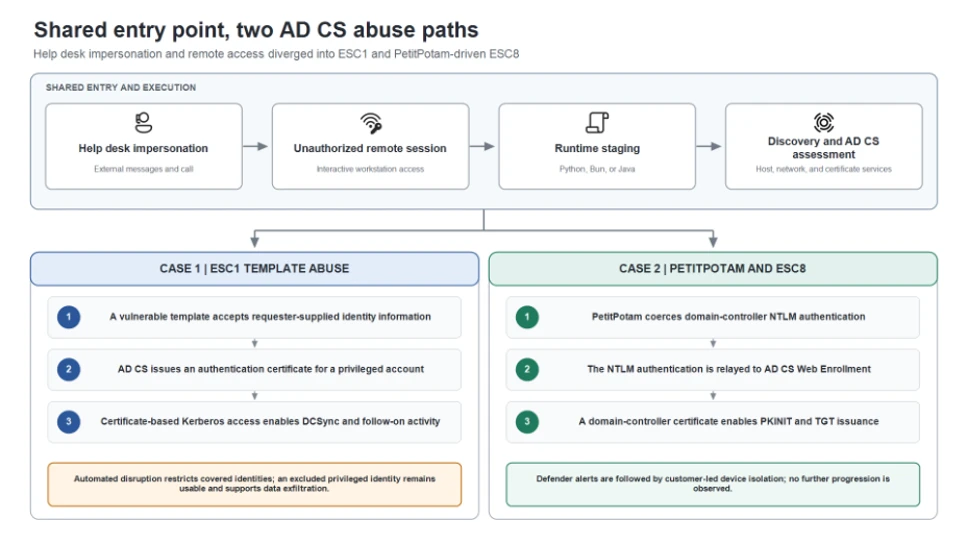
Shared initial access and execution pattern
Teams helpdesk impersonation and remote access
Both incidents began with Teams phishing messages and calls that impersonated support personnel. The social engineering persuaded a user to establish an attacker-controlled remote session, primarily by guiding the user to open Quick Assist and provide the connection code. This gave the attacker hands-on-keyboard access to the workstation. Across the broader activity, organization-themed onmicrosoft.com tenant names and support-oriented display names were used to make the external contact appear familiar.
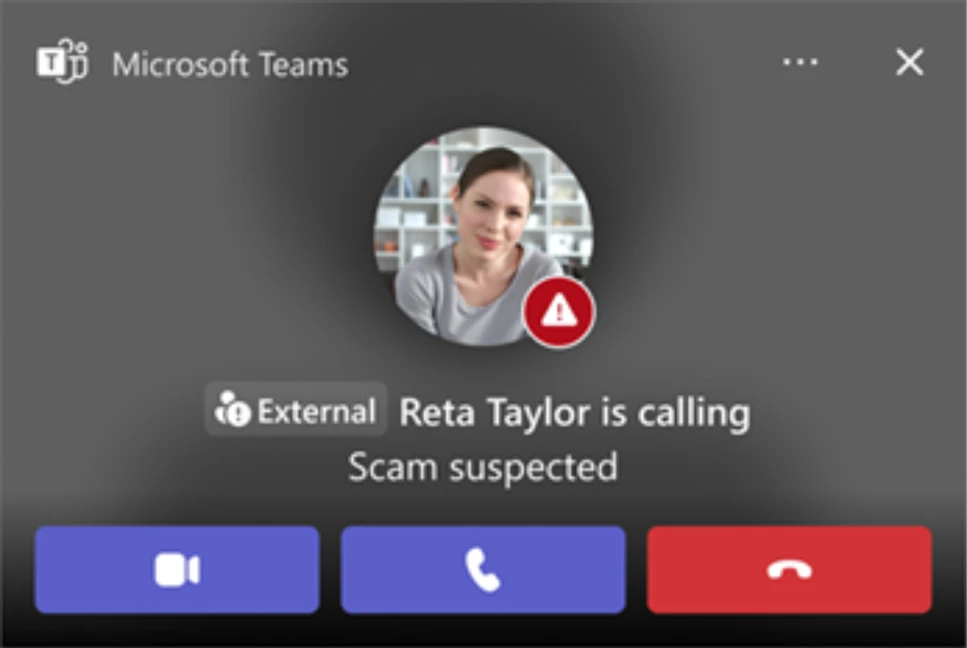
The remote session was the decisive transition in the attack. Immediately after the user granted control through Quick Assist, the attacker used the session to place an archive in the victim’s Downloads folder. Commands launched during the session created a KB-prefixed staging directory under the user’s profile, extracted the archive into that directory, and started the included payload with a portable Python, JavaScript, or Java runtime. The payload then performed host and network discovery and began assessing AD CS.
Portable runtime staging and execution variants
The runtime and packaging varied between deployments, but the execution pattern remained consistent: an archive was placed on the device during the remote session, extracted into a newly created user-profile directory, and used to launch attacker-controlled code. In one JavaScript variant, a renamed executable retained version metadata identifying it as the Bun runtime and launched the staged loader. A separate variant used a staged Java runtime to launch a Java source file.
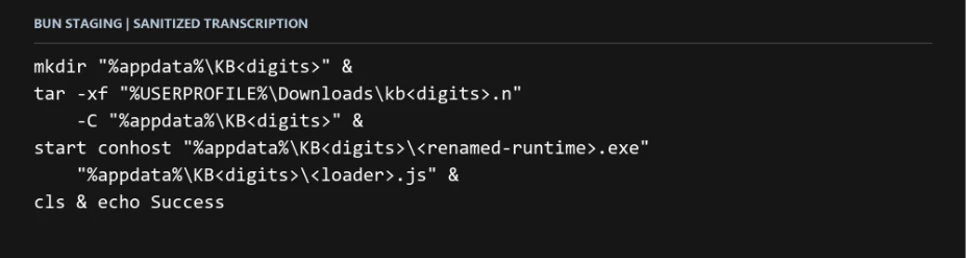
File names alone are weak indicators. The actionable pattern is a portable runtime launched from a newly created, user-writable staging directory after an unauthorized remote session, followed by script execution, discovery commands, or connections to identity infrastructure.
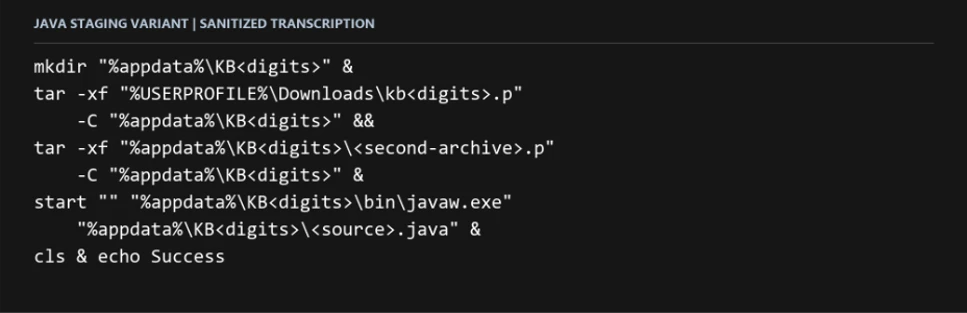
The Java variant confirms that runtime choice can change between deployments. The AD CS behavior in each incident should be validated through the initiating process, account, device, and certificate records rather than assumed from the presence of Bun or Java alone.
Host discovery and AD CS assessment
The staged components queried Windows version information, network configuration, and running processes. These commands are common in administration, but they become high-value signals when it is launched by a renamed runtime from an uncommon location and follow an unexpected remote-support session.
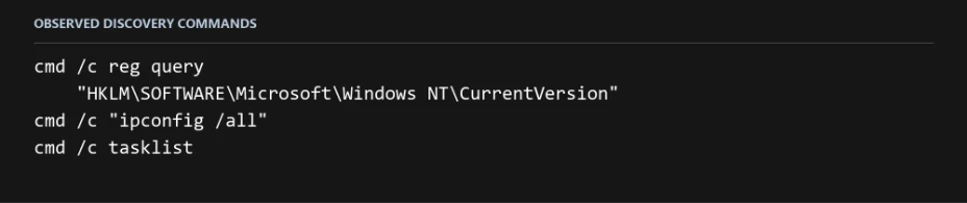
The compromised workstation also connected to domain infrastructure using LDAPS and SMB.
From this shared workstation foothold, the incidents followed different certificate-abuse paths. In Case 1, the attacker exploited an ESC1-vulnerable certificate template. In Case 2, the attacker used PetitPotam to coerce domain-controller authentication and relay it to AD CS Web Enrollment through ESC8.
Case 1: ESC1 abuse and the cost of an identity exclusion
ESC1 certificate requests expand privilege
The first Teams-phishing wave targeted three user accounts and compromised one workstation. From the shared foothold described above, the attacker examined AD CS for a privilege-escalation path.
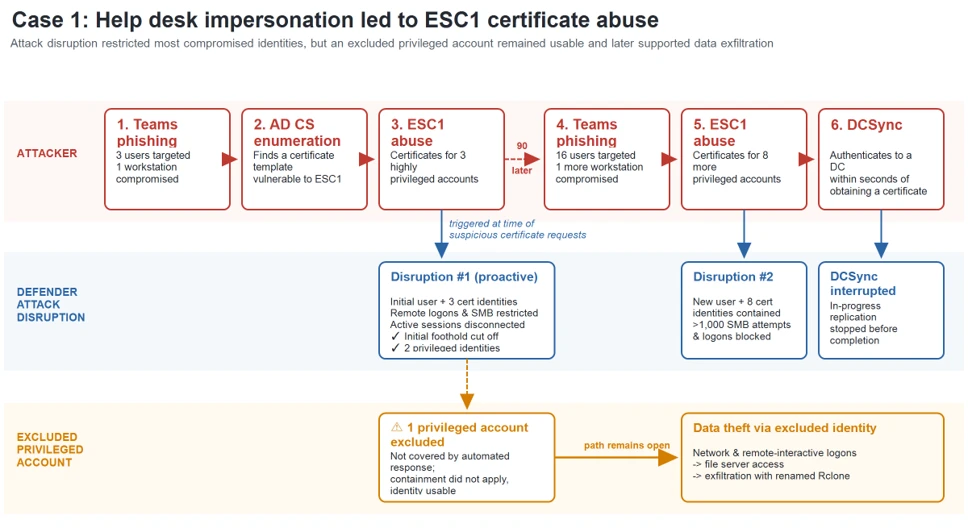
The attacker found a certificate template vulnerable to ESC1. ESC1 describes a template configuration in which a requester can supply identity information in the certificate request and obtain a certificate that supports authentication. When broad enrollment rights and weak issuance controls are combined with that setting, a low-privileged account can request a certificate representing a privileged identity.
In the first wave, the attacker obtained certificates for three highly privileged accounts. Microsoft Defender attack disruption targeted the initially compromised user and those three certificate-compromised identities. Remote logons and Server Message Block (SMB) access were restricted and active sessions were disconnected. One privileged account was excluded from automated response, so containment did not apply to that identity.
Renewed phishing and ESC1 privilege expansion
About 90 minutes after the first disrupted session, the attacker launched a larger Teams-phishing wave targeting 16 users and compromised another workstation. The attacker again abused the ESC1-vulnerable template, this time obtaining certificates for eight additional privileged accounts.
Attack disruption targeted the newly compromised user and the eight certificate-compromised identities. More than 1,000 subsequent SMB file-access attempts and additional logon attempts were blocked, limiting the attacker’s ability to reuse those accounts for lateral movement.
DCSync, the excluded account, and data theft
Within seconds of obtaining one privileged certificate, the attacker authenticated to a domain controller and performed DCSync while containment was taking effect. Attack disruption limited additional replication and follow-on use, but the operation had already begun.
The privileged account excluded during the first disruption remained available. The attacker continued to use it for network and remote-interactive logons, reached a file server, and launched a renamed copy of Rclone using the filename SearchApp.exe. The command recursively copied data from a file-server share to an external Secure File Transfer Protocol (SFTP) destination, used 20 concurrent transfers, selected files up to three years old, and excluded several executable, database, virtual-disk, media, temporary, and log file types.
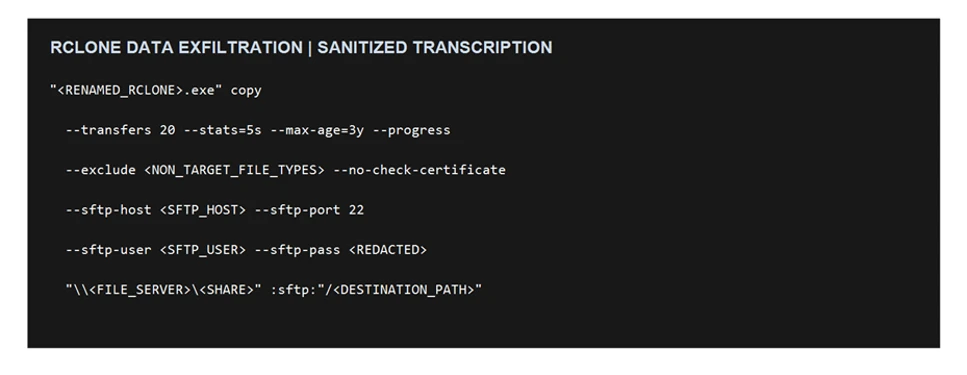
The incident demonstrates that partial identity containment can reduce attack activity while still leaving a viable privileged route.
Case 2: PetitPotam and ESC8 turn a workstation into a domain-controller identity
PetitPotam coerces domain-controller authentication
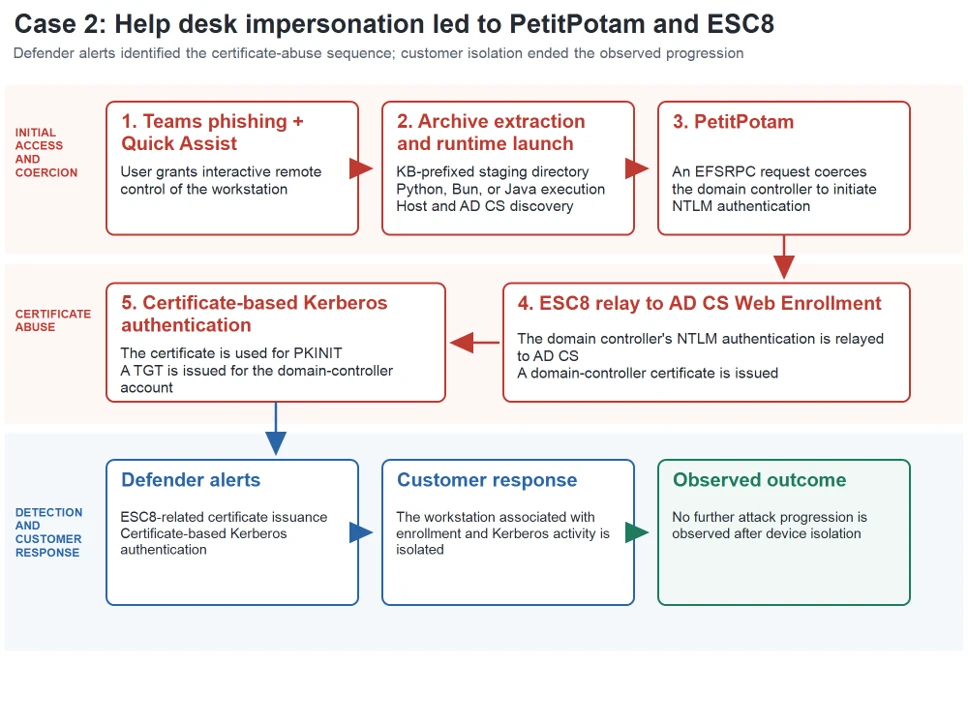
The ESC1 path used in the first case was not available in this environment. Instead, the attacker used PetitPotam to send requests over the Encrypting File System Remote Protocol (EFSRPC), causing the domain controller to authenticate to an attacker-controlled system using its machine account. The attacker then relayed that NTLM authentication to AD CS Web Enrollment without knowing the domain controller’s password.
NTLM relay reaches AD CS Web Enrollment
The attacker relayed the domain controller’s NTLM authentication to AD CS Web Enrollment. This technique is known as ESC8. It targets an enrollment web endpoint that accepts NTLM without sufficient relay protection, allowing the attacker to submit a certificate request as the relayed account.
The AD CS server authenticated the domain-controller machine account even though the connection originated from another device. That identity-to-source mismatch is a strong investigation pivot: correlate the machine account, source device, Web Enrollment request, Certification Authority (CA) issuance record, and subsequent Kerberos activity.
After authenticating to Web Enrollment as the domain controller, the attacker requested and retrieved a certificate using the Domain Controller template. The important service paths are the certificate submission and retrieval endpoints under /certsrv; isolated URL access is not malicious by itself and must be correlated with the authenticated identity, source device, process, and CA request.
Certificate-based Kerberos authentication
The attacker used the newly issued domain-controller certificate for Kerberos PKINIT and obtained a ticket-granting ticket (TGT) for the domain controller. This step converted a relayed NTLM authentication into a certificate-backed Kerberos identity.
PKINIT success is the response threshold: responders should investigate the requesting device, authenticated account, issued certificate, active Kerberos sessions, and any service-ticket use. Certificate revocation and Kerberos ticket review are separate containment actions.
Customer-led device isolation and observed outcome
Microsoft Defender generated ESC8-related alerts, after which the customer isolated the workstation associated with the certificate-enrollment and Kerberos activity. The documented containment action in this case was customer-led device isolation. No further attack progression was observed following isolation.
Why the response outcomes differed
In Case 1, an exclusion left a compromised privileged account available to the attacker despite disruption of other identities. In Case 2, customer-led device isolation followed Defender alerts, and no further attack progression was observed.
Actionable investigation methods
The most useful artifacts are not individual commands or ports in isolation. Investigators should reconstruct the chain across collaboration, endpoint, identity, and certificate systems.
- Teams and remote access: identify the external tenant, user interaction, call or chat timing, remote-session start, approved remote monitoring and management (RMM) process, and child processes created during the session.
- Runtime staging: inspect newly created KB-prefixed or application-like folders, archive extraction, runtime metadata, script operands, parent-child relationships, and subsequent network activity.
- Directory interaction: use network data to identify LDAPS and SMB connections, then use endpoint and directory logs to determine what the initiating process did. TLS intentionally hides LDAP query content from passive network inspection.
- ESC1: review certificate request and issuance events, requester identity, subject and Subject Alternative Names (SAN) values, template name, enrollment permissions, and the first authentication performed with the issued certificate.
- PetitPotam and ESC8: correlate EFSRPC activity, outbound authentication by the domain controller, the device that relayed the authentication, Web Enrollment access, CA request and issuance records, and PKINIT from the originating workstation.
- Disruption and containment: enumerate every compromised identity and device, review exclusions before and during response, revoke unauthorized certificates, and assess active Kerberos tickets separately
Reduce support impersonation and unauthorized remote access
- Require users to verify unsolicited support requests through a known internal channel before joining a call, sharing a screen, or starting a remote-control session.
- Encourage users to pay attention to warnings in incoming messages and calls when impersonation is detected.
- Review Teams external-access and federation policies. Limit external domains to business requirements and investigate newly observed organization-themed or helpdesk-themed tenants in context.
- Restrict remote-support software to approved products, operators, and workflows. Alert when approved RMM tools extract archives, create interpreters, or launch scripts from user-writable paths.
Constrain runtime-based execution
- Use App Control for Business or equivalent application control to restrict unapproved portable runtimes and script execution from user-writable locations.
- Evaluate file identity through signer, original filename, product metadata, path, parent process, and behavior. A renamed executable can retain legitimate version information.
- Test relevant attack surface reduction rules and endpoint protection policies. Do not assume controls for Windows script hosts automatically cover JavaScript executed through Bun or source files launched through Java.
Harden AD CS against ESC1 and ESC8
- Follow Microsoft’s secure configuration guidance for mitigating NTLM relay against AD CS: https://support.microsoft.com/help/5005413
- Review authentication-capable templates for requester-supplied subject information, broad enrollment permissions, weak issuance requirements, and excessive certificate purpose. Remove unnecessary enrollment rights and require approval where appropriate.
- Inventory AD CS Web Enrollment and Certificate Enrollment Web Service endpoints. Remove endpoints that are not required.
- Require HTTPS and enforce Extended Protection for Authentication (EPA) on enrollment web endpoints. HTTPS protects confidentiality; EPA provides the channel binding needed to resist NTLM relay.
- Disable NTLM on enrollment services where operationally feasible and validate Kerberos-only authentication before broad enforcement.
- Use Defender for Identity AD CS security posture assessments to identify ESC1-related template exposure and insecure enrollment Internet Information Services (IIS) endpoints associated with ESC8: https://learn.microsoft.com/defender-for-identity/security-posture-assessments/certificates
Enable certificate auditing and prepare certificate-aware response
- Enable the Certification Services advanced audit subcategory for success and failure, and configure the Certification Authority audit filter to record request and issuance activity.
- Preserve CA security events, CA database records, IIS or Web Enrollment logs, endpoint process lineage, identity alerts, and Teams interaction records.
- If an unauthorized certificate was issued, identify its serial number and thumbprint, revoke it, publish updated revocation information, and confirm that relying systems can obtain the update.
- Review certificate-based Kerberos activity and active tickets. Revoking a certificate does not retroactively invalidate TGTs or service tickets that were already issued.
- Treat containment exclusions as incident decisions. If an account or device cannot be automatically contained, assign a compensating manual action and verify completion.
Microsoft Defender XDR detections and disruption
Microsoft Defender XDR can connect collaboration, endpoint, identity, certificate, and Kerberos signals. Alert names and availability depend on product configuration and enabled sensors.
– Microsoft Teams chat initiated by a suspicious external user
– IT Support Teams Voice phishing following mail bombing activity – A user clicked through to a potentially malicious URL.
– A potentially malicious URL click was detected.
– Suspicious Teams Chat likely involved in remote management and dangerous commands
– Possible Teams phishing affecting more than two users
Microsoft Defender for Endpoint
– Possible initial access from an emerging threatExecutionBun, or Java runs staged scripts from user-writable paths.Microsoft Defender for Endpoint
– Possible initial access from an emerging threat
– Suspicious JavaScript processDiscoveryStaged runtimes query host configuration and interact with domain infrastructure.Microsoft Defender for Identity
– Possible Active Directory Certificate Services enumeration
– Suspicious Active Directory Certificate Services (AD CS) certificate requestCredential accessESC1 certificate requests target privileged identities.Microsoft Defender for Endpoint
– Suspicious Domain Controller authentication to Active Directory Certificate Services server
Microsoft Defender for Identity
– Suspicious Active Directory Certificate Services (AD CS) misconfigured certificate template abuse (ESC1)Credential accessDomain-controller NTLM authentication reaches AD CS from another device.Microsoft Defender for Endpoint
– Possible NTLM relay attackCredential accessESC8 Web Enrollment issues a machine certificate after NTLM relay.Microsoft Defender for Endpoint
– Suspicious Active Directory Certificate Services (AD CS) machine certificate issuance abuse (ESC8)Credential accessPKINIT succeeds and a TGT is issued.Microsoft Defender for Identity
– Suspicious certificate usage over Kerberos protocol (PKINIT)
– Suspected suspicious Kerberos ticket requestImpact preventionCompromised identities or devices are restricted during an active incident.Microsoft Defender for Endpoint
– Possible source of DCSync attack
Microsoft Defender for Identity
– Suspected DCSync attack (replication of directory services)
Microsoft Security Copilot
Security Copilot can help analysts summarize the Teams-to-remote-access sequence, review staged runtime behavior, correlate certificate alerts with affected identities, and prepare containment tasks. Useful prompts should ask for the initiating device, remote-session context, certificate request, issued identity, PKINIT activity, and any response exclusions. Results depend on connected plugins, permissions, and the evidence available to the incident.
Threat intelligence reports
Microsoft customers can use Microsoft Defender XDR Threat Analytics to review relevant reports, related incidents, impacted assets, and recommended actions. Search for Teams support impersonation, portable Bun or Java runtimes, AD CS certificate abuse, NTLM relay, ESC1, ESC8, and certificate-based Kerberos authentication. Campaign-specific report.
Advanced hunting
Use these queries to investigate related activity. Tune time windows and filters for your environment. Matches require investigation.
Teams external contact and available impersonation signals
Use these queries as investigation starting points. Validate field availability and expected values in your tenant, tune for legitimate activity, and correlate matches with incidents rather than treating a single result as proof of compromise.
Teams external contact and available impersonation signals
Find external Teams chats and available impersonation signals.
CloudAppEvents
| where Timestamp > ago(7d)
| where Application == "Microsoft Teams"
| where (ActionType == "ChatCreated" and IsExternalUser == true) or ActionType in~ ( "TeamsImpersonationDetected", "SecurityRiskInCallDetected")
| order by Timestamp desc
Bun or Java execution from KB-prefixed staging paths
Find Bun or Java running scripts from KB-prefixed AppData folders.
DeviceProcessEvents
| where Timestamp > ago(7d)
| where ProcessVersionInfoOriginalFileName =~ "bun.exe" or FileName in~ ("bun.exe", "java.exe", "javaw.exe")
| where ProcessCommandLine contains ".js" or ProcessCommandLine contains ".java"
| where FolderPath matches regex @"(?i)\\AppData\\Roaming\\KB[0-9]+\\"
| order by Timestamp desc
Network activity initiated by the staged runtime
Find network connections initiated by the staged runtime.
DeviceNetworkEvents
| where Timestamp > ago(7d)
| where InitiatingProcessVersionInfoOriginalFileName =~ "bun.exe" or InitiatingProcessFileName in~ ( "bun.exe", "java.exe", "javaw.exe")
| where RemotePort in (80, 445, 636, 88)
| where InitiatingProcessFolderPath matches regex @"(?i)\\AppData\\Roaming\\KB[0-9]+\\"
| order by Timestamp desc
Enrollment, relay, and PKINIT alerts with their evidence
Find relay, AD CS, and PKINIT alerts with their related evidence.
AlertInfo
| where Timestamp > ago(7d)
| where Title contains "NTLM relay" or Title contains "Certificate Services" or Title contains "PKINIT" or Title contains "Kerberos ticket request"
| join kind=inner ( AlertEvidence | where Timestamp > ago(7d)
) on AlertId
MITRE ATT&CK techniques observed
This threat has exhibited use of the following attack techniques. For standard industry documentation, refer to the MITRE ATT&CK framework.
Initial Access
- T1566.003 Phishing: Spearphishing via Service | Teams messages used for support impersonation.
- T1566.004 Phishing: Spearphishing Voice | A Teams call formed part of the social-engineering interaction.
Command and Control
- T1219 Remote Access Software | An attacker-controlled remote monitoring and management session provided interactive access.
Execution
- T1059.003 Command and Scripting Interpreter: Windows Command Shell | Shell commands staged archives, launched the runtime, and initiated native discovery commands.
- T1059.007 Command and Scripting Interpreter: JavaScript/JScript | Bun executed attacker-supplied JavaScript modules.
Defense Evasion
- T1036 Masquerading | The activity used update-themed staging and a renamed Bun executable.
Discovery
- T1082 System Information Discovery | The runtime initiated a Windows version registry query.
- T1016 System Network Configuration Discovery | The runtime initiated ipconfig /all.
- T1057 Process Discovery | The runtime initiated tasklist.
Credential Access
- T1557 Adversary-in-the-Middle | Certificate authority telemetry showed a domain-controller identity authenticating from another device, supporting NTLM relay; no name-resolution poisoning was established.
- T1649 Steal or Forge Authentication Certificates | The activity involved abusive machine-certificate issuance through Certificate Services Web Enrollment and subsequent certificate-based authentication.
Indicators of compromise (IOC)
References
- Teams security best practices for safer messaging. Microsoft Learn (accessed 2026-10-29)
- Microsoft Defender for Office 365 support for Microsoft Teams. Microsoft Learn (accessed 2026-10-29)
- Application Control for Windows. Microsoft Learn (accessed 2026-10-29)
- Attack surface reduction rules reference. Microsoft Learn (accessed 2026-10-29)
- KB5005413: Mitigating NTLM relay attacks on Active Directory Certificate Services. Microsoft Support (accessed 2026-10-29)
- Defender for Identity security assessment: Insecure AD CS certificate enrollment IIS endpoints (ESC8). Microsoft Learn (accessed 2026-10-29)
Learn More
For the latest security research from the Microsoft Threat Intelligence community, check out the Microsoft Threat Intelligence Blog.
To get notified about new publications and to join discussions on social media, follow us on LinkedIn, X (formerly Twitter), and Bluesky.
To hear stories and insights from the Microsoft Threat Intelligence community about the ever-evolving threat landscape, listen to the Microsoft Threat Intelligence podcast.
Review our documentation to learn more about our real-time protection capabilities and see how to enable them within your organization.
- Learn more about securing Copilot Studio agents with Microsoft Defender
- Evaluate your AI readiness with our latest Zero Trust for AI workshop.
- Microsoft 365 Copilot AI security documentation
- How Microsoft discovers and mitigates evolving attacks against AI guardrails
- Prompt injection protection in Microsoft Defender for Office 365 – official documentation of the prompt injection protection in Microsoft Defender for Office 365.
- How Microsoft discovers and mitigates evolving attacks against AI guardrails | Microsoft Security Blog
- Manipulating AI memory for profit: The rise of AI Recommendation Poisoning | Microsoft Security Blog – a related example of an AI-era technique observed in email traffic
- Defending the inbox against prompt injection attacks | Microsoft Defender for Office 365 Blog – feature announcement introducing prompt injection protection in Microsoft Defender for Office 365.
- Learn how Microsoft is reimagining the SOC for the agentic era with ISOC in Microsoft Defender
The post From help desk impersonation to AD CS abuse: Investigating ESC1 and ESC8 intrusion paths appeared first on Microsoft Security Blog.